Non classé

WordPress.org blog: WordPress 6.9.3 and 7.0 beta 4

WordPress 6.9.2 was released earlier today and addressed 10 security issues. A few users have subsequently reported an issue where the front end of their site was appearing blank after updating to 6.9.2. The issue has been narrowed down to some themes using an unusual approach to loading template files via “stringable objects” instead of primitive strings for file paths. Although this is is not an officially supported approach to loading template files in WordPress (the template_include filter only accepts a string), it nevertheless caused some sites to break. As a result, the Security Team has decided to address this in a fast follow 6.9.3 release. As always, it is recommended that you update your sites to the latest version of WordPress immediately. This ensures your site is protected by all available security fixes in 6.9.2 and that you will not be affected by the bug fixed in 6.9.3. Many thanks to those who reported the issue, assisted in narrowing down the problem, and helped with the fix. You can download WordPress 6.9.3 from WordPress.org, or visit your WordPress Dashboard, click “Updates”, and then click “Update Now”. If you have sites that support automatic background updates, the update process will begin shortly. You don’t have to do a thing! For more information on WordPress 6.9.3, please visit the version page on the HelpHub site. WordPress 7.0 beta 4 The next major release of WordPress will be version 7.0, which is planned for April 9, 2026. The Security Team has decided to package a new beta release (7.0 beta 4) to keep everyone protected from the patched vulnerabilities, including the dedicated members of the community focusing their time and effort on testing the upcoming release. This will be an additional beta release in the 7.0 release cycle. The schedule will remain the same going forward, but with five total beta releases instead of the previously planned four. The next 7.0 beta release is still scheduled for Thursday, March 12th. This beta version of the WordPress software is still under development. Please do not install, run, or test WordPress 7.0 beta versions on production or mission-critical websites. Instead, you should evaluate Beta 4 on a test server and site. Plugin Install and activate the WordPress Beta Tester plugin on a WordPress install. (Select the “Bleeding edge” channel and “Beta/RC Only” stream.) Direct Download Download the Beta 4 version (zip) and install it on a WordPress website. Command Line Use this WP-CLI command: wp core update –version=7.0-beta4 WordPress Playground Use the WordPress Playground instance to test the software directly in your browser. No setup is required – just click and go! Beta 4 updates and highlights WordPress 7.0 Beta 4 contains the ten security patches shipped in WordPress 6.9.2, and more than 49 updates and fixes since the Beta 3 release, including 14 in the Editor and 35 in Core.  Each beta cycle focuses on bug fixes. More are on the way, thanks to your help with testing. You can browse the technical details for all issues addressed since Beta 3 at these links: GitHub commits for 7.0 since March 5, 2026 Closed Trac tickets for 7.0 since March 5, 2026 As always, a successful release depends on your confirmation during testing. So please download and test! Props @peterwilson, @desrosj, @marybaum, @amykamala for peer reviewing.

WordPress.org blog: WordPress 6.9.3 and 7.0 beta 4 Lire la suite »
WordPress.org blog: WordPress 6.9.2 Release

WordPress 6.9.2 is now available! This is a security release that features several fixes. Because this is a security release, it is recommended that you update your sites immediately. You can download WordPress 6.9.2 from WordPress.org, or visit your WordPress Dashboard, click “Updates”, and then click “Update Now”. If you have sites that support automatic background updates, the update process will begin automatically. The next major release will be version 7.0, which is planned for April 9th, 2026. For more information on WordPress 6.9.2, please visit the version page on the HelpHub site. Security updates included in this release The security team would like to thank the following people for responsibly reporting vulnerabilities, and allowing them to be fixed in this release: A Blind SSRF issue reported by sibwtf, and subsequently by several other researchers while the fix was being worked on A PoP-chain weakness in the HTML API and Block Registry reported by Phat RiO A regex DoS weakness in numeric character references reported by Dennis Snell of the WordPress Security Team A stored XSS in nav menus reported by Phill Savage An AJAX query-attachments authorization bypass reported by Vitaly Simonovich A stored XSS via the data-wp-bind directive reported by kaminuma An XSS that allows overridding client-side templates in the admin area reported by Asaf Mozes A PclZip path traversal issue reported independently by Francesco Carlucci and kaminuma An authorization bypass on the Notes feature reported by kaminuma An XXE in the external getID3 library reported by Youssef Achtatal The WordPress security team have worked with the maintainer of the external getID3 library, James Heinrich, to coordinate a fix to getID3. A new version of getID3 is available here. As a courtesy, these fixes are being backported, where necessary, to all branches eligible to receive security fixes (currently through 4.7). As a reminder, only the most recent version of WordPress is actively supported. The backports are in progress and will ship as they become ready. Thank you to these WordPress contributors This release was led by John Blackbourn. In addition to the security researchers mentioned above, WordPress 6.9.2 would not have been possible without the contributions of the following people: Dennis Snell, Alex Concha, Jon Surrell, Isabel Brison, Peter Wilson, Jonathan Desrosiers, Jb Audras, Luis Herranz, Aaron Jorbin, Weston Ruter, and Dominik Schilling.

WordPress.org blog: WordPress 6.9.2 Release Lire la suite »

Matt: Gone (Almost) Phishin’

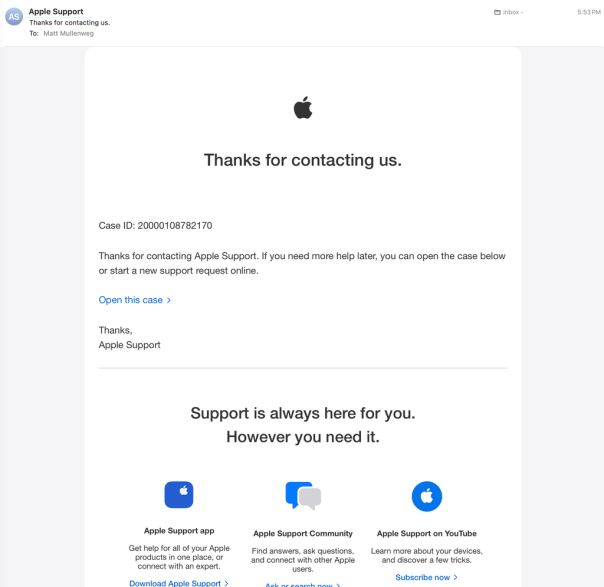
This is a little embarrassing to share, but I’d rather someone else be able to spot a dangerous scam before they fall for it. So, here goes. One evening last month, my Apple Watch, iPhone, and Mac all lit up with a message prompting me to reset my password. This came out of nowhere; I hadn’t done anything to elicit it. I even had Lockdown Mode running on all my devices. It didn’t matter. Someone was spamming Apple’s legitimate password reset flow against my account—a technique Krebs documented back in 2024. I dismissed the prompts, but the stage was set. What made the attack impressive was the next move: The scammers actually contacted Apple Support themselves, pretending to be me, and opened a real case claiming I’d lost my phone and needed to update my number. That generated a real case ID, and triggered real Apple emails to my inbox, properly signed, from Apple’s actual servers. These were legitimate; no filter on earth could have caught them. Then “Alexander from Apple Support” called. He was calm, knowledgeable, and careful. His first moves were solid security advice: check your account, verify nothing’s changed, consider updating your password. He was so good that I actually thanked him for being excellent at his job. That, of course, was when he moved into the next phase of the attack. He texted me a link to review and cancel the “pending request.” The site, audit-apple.com, was a pixel-perfect Apple replica, and displayed the exact case ID from the real emails I’d just received. There was even a fake chat transcript of the scammers’ actual conversation with Apple, presented back to me as evidence of the attack against my account. At the bottom of the page was a Sign in with Apple button that he told me to use. I started poking at the page and noticed I could enter any case ID and get the same result. Nothing was being validated. It was all theater. “This is really good,” I told Alexander. “This is obviously phishing. So tell me about the scam.” Silence. *Click*. Once I’d suspected what was happening, I’d started recording the call, so I was able to save a good chunk of it, which Jamie Marsland used to make a video about the encounter. You can hear for yourself exactly how convincing “Alexander” was. So let my almost-disaster help you avoid your own. Remember these rules. Don’t approve any password-reset prompts—those are the first part of the attack. Do not pass Go, just head directly to your Apple ID settings. Apple will never call you first. When you get an email from Apple—or, really, anyone telling you to complete a digital security measure—check the URL they’re trying to send you to. Apple Support lives on apple.com and getsupport.apple.com, nowhere else. After all, the best protection is knowing what this looks like before it happens.

Matt: Gone (Almost) Phishin’ Lire la suite »

How I Enabled Search by Blog Post Author in WordPress (in 3 Easy Steps)

When I started running a multi-author WordPress blog, I learned something important: readers develop favorite writers. But when they type an author’s name into your WordPress search box, nothing shows up, even if that author has published many posts. This happens because the default WordPress search feature does not include author names. Even if the content exists on your site, readers simply cannot find it. This issue can easily lead to a confusing search experience for readers. And that’s why enabling author search makes such a big difference. When visitors can search by author, they spend less time guessing and more time reading what they came for. I’ll show you how to allow search by blog post author in WordPress using SearchWP. It only takes a few minutes to set up and helps readers quickly find posts by the same author. 📝 Quick Summary: The default WordPress search does not include author names. To fix this, I recommend using SearchWP to add ‘Author’ as a searchable attribute in your algorithm settings. This allows readers to find posts by their favorite writers instantly. Why Allow Search by Blog Post Author in WordPress? When you allow search by blog post author, you improve how readers find and explore content on your site. When visitors can search for specific authors, they discover more relevant posts and spend more time reading. This feature is especially valuable if you run a multi-author blog. Readers often connect with particular writing styles and want to find more content from writers they enjoy. Here are the key benefits of enabling author search: 👔 Professional appearance – Author search shows that you’ve thought about your readers’ needs and signals that your site is well-organized. 🚀 Better user experience – Visitors can quickly find all posts by their favorite authors without clicking through multiple pages or guessing URLs. This reduces frustration and keeps people engaged with your content. 🔍 Improved content discovery – Author search helps readers navigate your site’s full content library beyond categories and tags. 📑 More page views per visit – When readers can easily find more content from authors they like, they naturally click through to additional articles. This increases engagement and time spent on your site. Now, here’s how to allow search by blog post author in WordPress: Step 1: Install and Activate the SearchWP Plugin Step 2: Customize Search Engine to Include Authors Step 3: Test Your New Search Bonus Tip: Customize WordPress Search Results Page Further FAQs About Searching Blog Posts by Author Related Articles for Improving WordPress Search Step 1: Install and Activate the SearchWP Plugin To add an author search to WordPress, I recommend using SearchWP. It is the best search plugin for WordPress because it enhances default WordPress search by indexing content types like authors, custom fields, and PDFs. This gives you complete control over your search results. We use SearchWP on some of our partner websites for better site search. To read more about our experience, see our complete SearchWP review. First, you’ll need to purchase a SearchWP plan. On the SearchWP website, click the ‘Get SearchWP Now’ button, pick a plan, and complete the registration steps. 📝 Note: You’ll need the SearchWP Standard plan or higher to make author names searchable. SearchWP does offer a free Live AJAX Search plugin, but it only adds instant live search functionality without the ability to customize search sources. Once you sign up, you can access your account dashboard and license key. Go ahead and download the SearchWP plugin ZIP file from your account area. The file will be saved to your computer’s downloads folder. Next, you’ll need to install and activate the plugin on your WordPress site. From your WordPress admin dashboard, go to Plugins » Add Plugin. Next, let’s click the ‘Upload Plugin’ button. In the file uploader, click ‘Choose File’ and ‘Install Now.’ When it finishes installing, click ‘Activate.’ If you need help, see our beginner’s guide on how to install a WordPress plugin. After activation, go to SearchWP » Settings to enter your license key. Simply paste the key you received when purchasing the plugin and click ‘Activate License’. The plugin will then launch an onboarding wizard to help you get started. You can follow the setup steps or skip them for now – we’ll configure everything in the next step anyway. Step 2: Customize Search Engine to Include Authors Now that SearchWP is active, you’ll need to configure it to include author names in your search results. This is where you tell the plugin to look at the author information when someone performs a search. In your WordPress dashboard, navigate to SearchWP » Algorithm. This is where you control what content SearchWP indexes and searches through. On this page, you’ll see the ‘Default’ search engine – this is the one you’ll customize for author search. Let’s click the ‘Sources & Settings’ button to view all the content types that SearchWP can search through. By default, it includes posts, pages, and media, but you can add more sources. For example, if you’re running a WooCommerce store, you can also check the ‘Products’ box. You can also uncheck any options you want to exclude from search results. When you’re ready, click ‘Done’ to save your changes. Next, under the ‘Posts’ source section, click the ‘Add/Remove Attributes’ button. This will let you choose which details SearchWP should include in its search results. In the popup that appears, look for the ‘Author’ option in the available sources. Simply check the box next to ‘Author’ to add author names as a searchable attribute, then click ‘Done’ to close the popup. Once you’ve added the author attribute, you’ll see a relevance weight slider next to it. This slider controls how important author matches are compared to other search results. I recommend setting the slider somewhere in the middle range. This makes sure that when someone searches for an author’s name, those results appear prominently without completely overshadowing other relevant content. After adjusting the weight, click the ‘Save Changes’

How I Enabled Search by Blog Post Author in WordPress (in 3 Easy Steps) Lire la suite »

Gutenberg Times: PHP-only blocks, WordCamp Asia, Dev Notes for WordPress 7.0 — Weekend Edition #360

Hi there, I held my first walk-through of WordPress 7.0 with friends at the Santa Clarita WordPress Meetup. The group was really excited about all the big new features and the small quality-of-life (QoL) improvements. Jessica Lyschik and I also discussed many features coming to WordPress 7.0 on our latest podcast episode. Listen in if you are curious. Below you also find the links to the first set of Dev Notes for WordPress 7.0. Beta 4 will come out next week (3/12). Release candidate 1 is scheduled for March 19. It is now time to help test WordPress 7.0 Enjoy your weekend and these notes. Yours, Birgit WordCamp Asia heads to Mumbai on April 10–11, and I shared my personally curated session picks — leaning heavily into block editor, themes, and AI. Highlights include Ryan Welcher on the Interactivity API, a Playground + AI testing pipelines talk by Fellyph Cintra, and a closing keynote from Matt Mullenweg. I will also be leading a Contributor Day workshop on building a block theme from scratch. The schedule still has several TBD slots, so it’s worth checking back. Get your WordCamp Asia 2026 event pass and join the WordPress community in Mumbai on April 9–11! Developing Gutenberg and WordPress WordPress 7.0 Beta 3 is now available for testing. The final release is coming closer. It’s the time of the release cycle when Developer Notes are published ahead of Release Candidate 1. For the new Breadcrumbs block, Nik Tsekouras documents the two PHP filters developers will want to know. block_core_breadcrumbs_items lets you modify, add, or remove items just before rendering — handy for prepending a custom “Shop” crumb in WooCommerce. block_core_breadcrumbs_post_type_settings gives you control over which taxonomy and term appear in the trail, with sensible fallback behavior when your preferred term isn’t assigned. Props to Karol Manijak for the implementation. Dave Smith details one of the more exciting 7.0 additions for theme developers: Customisable Navigation Overlays. Mobile hamburger menus were previously locked to a fixed default design — now you can build your overlay from any blocks and patterns directly in the Site Editor. Themes can bundle overlays as template parts registered with a new navigation-overlay area in theme.json. The feature is opt-in currently full-screen only, and props go to Mike McAlister, whose Ollie Menu Designer plugin helped validate the community demand. Luis Herranz outlines key updates in the Interactivity API changes in WordPress 7.0. The main highlight is the new watch() function, which helps developers to track state changes outside the DOM for tasks like logging and analytics. Additionally, state.url in core/router will now be filled by the server, improving navigation tracking. Note that the state.navigation properties are outdated and will be removed in a future version. André Maneiro rounds up 166 contributions from 35 authors landing in the DataViews space for WordPress 7.0. Highlights include a new activity timeline layout, expanded field validation rules, a combobox control for large datasets, and a groupBy object replacing the old groupByField string — a breaking change worth noting. DataForm gains a new details layout and collapsible card controls. A lot here for plugin developers building data-rich admin interfaces. Miguel Fonseca documents one of the most warmly received 7.0 additions: PHP-only block registration. Pass ‘autoRegister’ => true in the supports array alongside a render_callback, and your block appears in the editor without a single line of JavaScript. WordPress automatically generates Inspector Controls for supported attribute types — string, integer, boolean, and enum. Implemented by Ricky Pena, the comments section alone tells you how long PHP-first developers have been waiting for this one. Ryan Welcher and Ciprian Popescu went deeper on this topic and provided you with examples and explanations on their personal blogs. (See links below.) The latest episode is Gutenberg Changelog #127 – WordPress 7.0 Beta and Gutenberg 22.6 with special guest Jessica Lyschik, senior developer at Greyd In the video, 7.0 Beta, Gutenberg 22.5, Studio & AI: WordPress for Developers in February Ryan Welcher walks you through the February edition of the round-up series What’s new for Developers. You’ll get the highlights from Gutenberg 22.4 and 22.5: per-instance custom CSS, viewport-based block visibility, anchor support for dynamic blocks, and the long-awaited removal of extra editor wrapper divs. The iFrame enforcement planned for 7.0 has been delayed — more breathing room, but time to prepare is now. WordPress lead developer Dion Hulse has shipped something quietly useful: WordPress.org now serves clean Markdown output for every page, built on Dennis Snell’s html-to-md plugin. You can access it by appending ?output_format=md to any URL or sending an Accept: text/markdown header. The efficiency gains are real — one developer reported a WordPress docs page shrinking from 68k tokens to 11k. It’s a direct response to Mullenweg’s push to make WordPress.org a canonical knowledge source for AI agents. Ray Morey reporting for The Repository In this brief video, Jonathan Bossenger demonstrates WordPress 7.0 Beta 2’s new WP AI Client and Connectors settings page, explaining how connectors can install plugins and how developers can create AI features without tying users to a specific provider. A live CLI demo showcases this approach. Bossenger also discusses connector discovery UX and areas where core improvements are needed before 7.0 is released. Plugins, Themes, and Tools for #nocode site builders and owners WordPress contributor Nick Hamze has quietly improved the Featured Plugins tab in wp-admin, replacing a list that hadn’t changed in eight years with a rotating selection of eight lesser-known plugins, refreshed every two weeks. The goal, as Matt Cromwell reports for The Repository, is to surface genuinely promising newcomers — “not the giants, not the household names” — that you’d never stumble across through search or popularity rankings. Early results are striking; Ollie Menu Designer tripled its biggest download day within hours of appearing in the tab. Theme Development for Full Site Editing and Blocks Marko Ivanovic and Noam Almosnino shared their Telex experiments on the Automattic Design blog, showcasing what happens when designers get to build WordPress blocks by simply

Gutenberg Times: PHP-only blocks, WordCamp Asia, Dev Notes for WordPress 7.0 — Weekend Edition #360 Lire la suite »

Matt: Declaration of the Independence

Governments of the Industrial World, you weary giants of flesh and steel, I come from Cyberspace, the new home of Mind. On behalf of the future, I ask you of the past to leave us alone. You are not welcome among us. You have no sovereignty where we gather. 30 years a 1 month later, it seems like an apt time to revisit John Perry Barlow’s Declaration of the Independence of Cyberspace. The poetry is amazing.

Matt: Declaration of the Independence Lire la suite »

How to Turn a Blog Into a Book (Publish-Ready in No Time)

If you’ve been blogging for a while, you probably have dozens (or even hundreds) of posts sitting on your site. You may not realize that all the content you’ve already created could become a book that demonstrates your expertise and generates extra income. The challenge is figuring out how to actually make it happen without starting from scratch. Whether you want to create a physical book or sell eBooks directly from your WordPress site, the process is more straightforward than you might think. Your blog posts are simply book chapters that need to be organized and formatted properly. In this guide, I’ll walk you through my tested steps to transform your blog into a book. I’ll cover the entire process, including how to choose the right content, format it professionally, and decide between physical and digital formats that work best for your audience. TL;DR: Turning your blog into a book is a smart way to build authority and earn extra income using content you already have. This guide shows you how to organize your posts, refine your manuscript, and publish it as an eBook, audiobook, or physical book. Why Turn Your Blog Into a Book? You can turn your blog into a book to create a powerful asset that works for you in ways a website alone can’t. Your existing content already demonstrates your knowledge, so transforming it into a book simply packages that expertise in a new format. Here are the key benefits of transforming your blog content into a book: Build authority and credibility — Publishing a book positions you as an expert in your niche. This makes it easier to attract clients, partnerships, and media attention. Reach a broader audience — Some people prefer reading books over blog posts. Having your content in book format helps you connect with readers who might never visit your website. Create a tangible record of your work — A book serves as a permanent archive of your best ideas and insights. This preserves your knowledge in a format that lasts beyond changing web technologies. Open new revenue streams — Selling books creates an additional income source, whether through eBook sales, print-on-demand services, or using your book as a lead magnet to grow your email list and attract higher-paying opportunities. The beauty of this approach is that you’re not starting from zero. Your blog posts already contain the foundation, so you’re simply reorganizing and refining what you’ve already written. Now, here are the steps for creating a book from your WordPress blog posts: Determine Your Goal and Target Audience Audit Your Blog Posts and Find Your Book’s Big Idea Select Posts and Turn Them Into a Book Outline Compile Your Book Content Bridge Posts, Fill Gaps, and Adapt Your Writing for a Book Edit and Polish Your Blog-to-Book Manuscript Format and Design Your Book Convert Your Manuscript Into Final Book Formats Publish and Sell Your Book FAQ: Common Questions About Turning a Blog Into a Book Additional Resources for Authors Step 1: Determine Your Goal and Target Audience Before you start selecting blog posts and organizing content, you need to be clear on what you want your book to achieve. This decision will shape everything from which posts you include to how you price and distribute the final product. Determine Your Goal Start by asking yourself whether your book will primarily serve as a product for sale, a lead magnet to attract new readers, or a tool to build authority in your niche. Each goal requires a slightly different approach. If you’re creating a product for sale, then you’ll want to focus on providing comprehensive value that readers can’t easily find for free elsewhere. This might mean adding exclusive content, updated information, or a more structured learning experience. On the other hand, if your book will serve as a lead magnet, then you can offer it for free in exchange for email addresses. This approach works well when your main income comes from services, consulting, or higher-priced products. If you are having trouble deciding, here is a quick rule of thumb: If you sell services (like coaching or web design), then a free lead magnet book usually works best to attract clients. On the other hand, if you earn mostly from affiliate marketing or ads, then selling the book directly is often the better choice. Determine Your Target Audience Next, you’ll need to identify your ideal reader and the specific problem your book will solve. Think about how the book will appeal to both your existing audience and potential new customers interested in your niche. I recommend writing down a simple description of your target reader. For example: ‘Small business owners who want to improve their WordPress site’s SEO but don’t have technical skills.’ This clarity helps you make better decisions about which content to include. For details, you can see our guide on how to choose a target audience for your blog. You should also consider which format makes the most sense for your goals and audience. The three main options each have distinct advantages: eBook — Cost-effective to produce and distribute, with broad reach across multiple devices and platforms. eBooks are perfect if you want to get your book out quickly without upfront printing costs. Audiobook — Popular in audio markets and accessible for people who prefer listening while commuting or exercising. Audiobooks can command higher prices and reach audiences who might not read traditional books. Physical Book — Creates a tangible product that can be easier to sell at higher price points. However, it involves higher production costs and shipping considerations. You don’t have to choose just one format. Many authors start with an eBook and then expand to audiobook or print versions based on demand. Step 2: Audit Your Blog Posts and Find Your Book’s Big Idea Now that you know your goal and audience, it’s time to look at what you’ve already created. This step involves evaluating your existing blog content to find the posts that will form the foundation of your book. Audit

How to Turn a Blog Into a Book (Publish-Ready in No Time) Lire la suite »

WordPress.org blog: WordPress 7.0 Beta 3

WordPress 7.0 Beta 3 is available for download and testing! This beta version of the WordPress software is still under development. Please do not install, run, or test this version of WordPress on production or mission-critical websites. Instead, you should evaluate Beta 3 on a test server and site.WordPress 7.0 Beta 3 can be tested using any of the following methods: Plugin Install and activate the WordPress Beta Tester plugin on a WordPress install. (Select the “Bleeding edge” channel and “Beta/RC Only” stream.) Direct Download Download the Beta 3 version (zip) and install it on a WordPress website. Command Line Use this WP-CLI command: wp core update –version=7.0-beta3 WordPress Playground Use the WordPress Playground instance to test the software directly in your browser. No setup is required – just click and go! The scheduled final release date for WordPress 7.0 is April 9, 2026. The full release schedule can be found here. Your help testing Beta and RC versions is vital to making this release as stable and powerful as possible. Please continue checking the Make WordPress Core blog for 7.0-related posts in the coming weeks for more information. Thank you to everyone who is contributing with testing! Catch up on what’s new in WordPress 7.0: Read the Beta 2 announcement for details and highlights. How to test this release Your help testing the WordPress 7.0 Beta 3 version is key to ensuring everything in the release is the best it can be. While testing the upgrade process is essential, trying out new features is equally important. This detailed guide will walk you through testing features in WordPress 7.0. If you encounter an issue, please report it to the Alpha/Beta area of the support forums or directly to WordPress Trac if you are comfortable writing a reproducible bug report. You can also check your issue against a list of known bugs.Curious about testing releases in general? Follow along with the testing initiatives in Make Core and join the #core-test channel on Making WordPress Slack. Beta 3 updates and highlights WordPress 7.0 Beta 3 contains more than 148 updates and fixes since the Beta 2 release, including 70 in the Editor and 78 in Core.  Each beta cycle focuses on bug fixes, and more are on the way with your help through testing. You can browse the technical details for all issues addressed since Beta 2 using these links: GitHub commits for 7.0 since February 26, 2026 Closed Trac tickets for 7.0 since February 26, 2026 Tapping into the power of AI is even easier in Beta 3! The WP AI Client Connectors screen now dynamically registers providers from the WP AI Client registry, in addition to the 3 default providers, giving users more flexibility and command over AI integrations. A Beta 3 haiku Through sun set and rise, Beta 3 takes off and flies. Seven soon arrives. Props to @annezazu, @jeffpaul, @chaion07, @audrasjb and @valentingrenier for proofreading and review.

WordPress.org blog: WordPress 7.0 Beta 3 Lire la suite »