Non classé

Matt: Bay Lights are Back!

Tonight, a project very near and dear to my heart, the Bay Lights in San Francisco, are officially re-lighting after a three-year hiatus. It’s been an incredible journey getting here. I literally mortgaged my apartment in 2013 to help fund them the first time around, and it’s such an honor to see them relit now with better technology and new programming from the amazing artist Leo Villereal. Whether you’re looking down at the lights from a penthouse or top office, or up at them from the water along the Embarcadero, this is truly an art project that illuminates the soul of everyone in San Francisco, radically accessible and open. I’ve heard they’re still raising around 500k to close out the project. You can dedicate a light here for someone special. I’m going to do one to honor my father, who passed in 2016. If you’d like to be part of San Francisco’s boom loop and have a pleasant twinkle of enlightenment every time you see the bridge, I encourage you to donate as well! If you live somewhere with a view of the bridge, think of it as buying a piece of art you’ll enjoy every night, and also having that warm feeling of being part of making San Francisco more beautiful for everyone. I’m on the board of Illuminate, which only has two full-time employees, and I’ve never seen another non-profit generate so much public joy and benefit with so few people. They’re also behind the Golden Mile and the live music at the Golden Gate Bandshell. Please consider making a one-time donation of a light, which is anywhere from $100 to $2,500, or become a recurring member of the Illuminate Tribe, or if you are really part of making San Francisco better consider being an Illuminary at 50k/yr. Also, thank you to all the WordPress community members who have done so much to support this project and help them fundraise and improve their website. It’s such a great example of the WordPress open source spirit and ethos. San Francisco is so back! Let’s go!

Matt: Bay Lights are Back! Lire la suite »

Matt: Introducing Me.sh

Very excited to share that the Clay.earth team that joined Automattic last year is re-launching under a new, very cool name and brand: Mesh. Imagine something that joins you (me) to everyone you’re connected to. It’s going to be a very important layer of the distributed identity and social work we’re doing. It’s an amazing app you should try out if you haven’t yet. Available on the web, MacOS, Windows, iOS, and even the Vision Pro. Stunning design.

Matt: Introducing Me.sh Lire la suite »

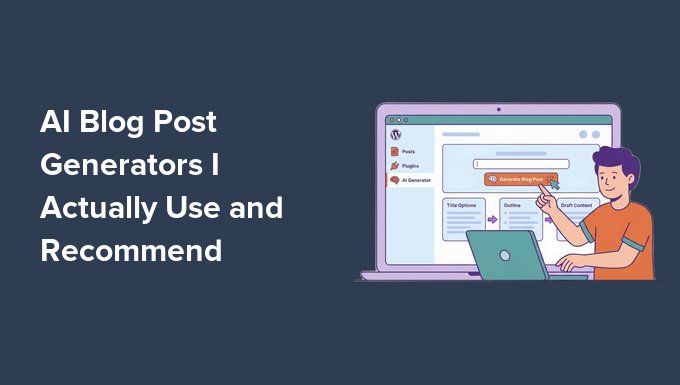
5 Best AI Blog Post Generators I Actually Use (& Recommend)

Writing blog posts can take a lot of time. Between brainstorming ideas, creating outlines, and turning everything into a polished article, it’s easy to get stuck staring at a blank page. That’s where AI can make a big difference. Today’s AI blog tools have changed blogging by helping you generate ideas, write full blog post drafts, and optimize content for search engines. I’ve tried many AI blog generators while experimenting with different writing workflows, but only five really stood out for their quality, reliability, and ease of use. These are the tools I keep coming back to and use myself. In this guide, I’ll share the 5 best AI blog post generators worth trying, so you can blog faster and create better content. Quick Summary: I recommend All in One SEO (AIOSEO) if you want to write and optimize content directly inside WordPress. For a flexible AI partner that helps with brainstorming and conversational drafts, ChatGPT is my top choice. 💡My Verdict: The Best AI Blog Generators In a hurry? Take a look at my top picks to make a quick decision: # Tool Name Best For Pricing 🥇 All in One SEO AI writing + SEO optimization inside WordPress Starts at $49.50/yr + Free 🥈 ChatGPT Flexible AI content generation, brainstorming, and conversational writing Starts at $20/month + Free 🥉 Semrush AI Article Generator Data-driven SEO content creation with keyword insights Starts at $60/mo 4 Rytr Budget-friendly AI writing for quick drafts and beginners Starts at $7.50/month + Free 5 Jasper Enterprise-grade AI content creation for teams and agencies Starts at $59/month per seat Why AI Blog Post Generators Are Important for Bloggers AI blog post generators aren’t just a trend. They’re tools that actually make blogging faster, smarter, and more efficient. They handle time-consuming tasks so you can focus on creating better content and growing your blog. Here’s why these tools are essential: Save Time on Content Creation: Generate full drafts, outlines, or topic ideas in minutes, instead of spending hours writing from scratch. Improve Content Quality: Built-in grammar checks, SEO suggestions, and readability enhancements make your posts polished and professional. Scale Your Blogging Efforts: Publish consistently without needing a large writing team, which keeps your blog active and engaging. Experiment and Brainstorm Ideas: Quickly generate new angles, headlines, and meta descriptions to keep your content fresh. Integrate Easily: Many AI tools work directly with WordPress, Google Docs, or your favorite editors for a smooth workflow. Overall, using the right AI generator can improve how you approach blogging. With these tools, you’ll save time, boost quality, and consistently produce content your audience loves. How I Tested and Reviewed These AI Blog Generators I wrote a blog post with each tool to see how they perform in real-world scenarios. I wanted to know which AI blog generators truly deliver, so I put each tool through thorough testing. This helped me separate the ones that work well from those that fall short. Here’s how I tested them: Installed or Connected Tools – Set up each AI generator, including plugins, web apps, and integrations where applicable. This helped me see which tools were easy to use for beginners. Tested Writing Speed & Content Quality – Created full blog posts to evaluate readability, accuracy, and engagement. This allowed me to find the specific generators that deliver accurate, engaging text with minimal editing required. Compared Free vs Paid Plans – Assessed feature differences, limitations, and overall value between tiers to see which blog post generators are worth the money for bloggers. Evaluated Integration & Workflow – Tested how easily each tool works with WordPress, Google Docs, and other platforms to speed up workflows for writers. Checked SEO Friendliness – Reviewed built-in keyword suggestions, meta description support, and optimization features. This allowed me to see which platforms actively improve content visibility and can bring traffic to your website. Reviewed Support, Updates & Learning Curve – Examined documentation, tutorials, and customer support to see easy of use for beginners. Why Trust WPBeginner for AI Blog Generator Recommendations? At WPBeginner, we don’t just list tools—we test them in real-world blogging environments. This means you get recommendations based on actual usage, not marketing hype. Our guidance is always honest and beginner-friendly. We focus on tools that are easy to use, reliable, and deliver real value for bloggers of all levels. We’ve tested these AI blog generators on multi-author blogs and demo personal sites. This ensures our picks work no matter the size or scope of your blog. With WPBeginner, you can be confident these AI tools will help you create content faster, improve quality, and streamline your blogging workflow. To learn more, take a look at our editorial process. 💡Expert Tip: Always treat AI as your co-pilot, not an autopilot! To rank well on Google, you must review your AI-generated drafts, add your personal experience, and optimize the final text using a WordPress SEO plugin. Ready to get started? Let’s dive into my top picks for the best AI blog post generators: All in One SEO for WordPress – AI-Powered Blog Optimization & Content Assistant ChatGPT – Flexible AI Content Generation Semrush AI Article Generator – Create Search-Friendly Content in Minutes Rytr – Budget-Friendly AI Assistant Jasper – Enterprise-Grade AI Content Creator Other AI Blog Generators Worth Trying Which AI Blog Generator Should You Use? Frequently Asked Questions About AI Blog Post Generators Additional Resources to Help You Write Blog Posts 1. All in One SEO for WordPress – AI-Powered Blog Optimization & Content Assistant ✅ Pros of All in One SEO ✅ AI-powered title and meta description generation✅ Creates SEO-optimized blog post drafts✅ Generates tables, key takeaways, and FAQ sections with AI✅ Built-in content readability scoring for polished posts✅ AI Image Generator for unique visuals ✅ An intuitive AI Assistant block ✅ Works completely inside WordPress ❌ Cons of All in One SEO ❌ Free version is limited❌ AI features are supplementary, not full content replacement Pricing Starts at $49.50/yr + Free Best For WordPress bloggers who want AI-assisted content creation and built-in SEO optimization in one tool After thorough testing, I’ve found All in One SEO to be

5 Best AI Blog Post Generators I Actually Use (& Recommend) Lire la suite »

Gary: Introducing claudaborative-editing

Human editor’s note: The post below was written by Claude Code. I personally don’t use LLMs to write for me, but I figured I’d make an exception just this once. Using entirely LLM-generated content isn’t a workable approach to writing good copy, but I’m interested in seeing how we can use these tools to interact with and improve the writing process! I’ve been using Claude Code for more and more of my daily work, and one thing that’s been bugging me is the gap between “Claude wrote some text” and “that text is on my blog.” There’s always a manual copy-paste step, formatting fixups, and the general friction of moving content between two worlds. So I built a bridge. claudaborative-editing is an MCP server that lets Claude Code collaboratively edit WordPress posts in real time, right alongside you in the Gutenberg block editor. You open a post in your browser, Claude opens the same post from the terminal, and you both edit together — changes sync live via WordPress’s collaborative editing protocol. In fact, this very post is being written by Claude, using the tool. It’s claudaborative-editing all the way down. How it works WordPress 7.0 introduced real-time collaborative editing, built on Yjs — the same CRDT technology that powers tools like Figma and Notion. claudaborative-editing speaks this protocol natively: it maintains a Yjs document that mirrors your post, syncing changes back and forth with WordPress via HTTP polling. The CRDT handles merging, so simultaneous edits from you and Claude just work — no conflicts, no overwrites. Getting started takes about 30 seconds: npx claudaborative-editing setup The setup wizard validates your WordPress credentials and gives you the claude mcp add command to register the server. After that, Claude Code can connect to your site and start editing. What Claude can do The server exposes a full set of block-editing tools. Claude can list and open posts, read the current block structure, insert and remove blocks, update text content and attributes, move blocks around, and save. It works at the block level — the same granularity Gutenberg uses — so edits are precise and merge-safe. There’s a nice touch, too: when Claude writes or updates text, the changes stream into the editor character by character, like watching someone type. It’s a small thing, but it makes the collaboration feel real. You can also see Claude show up in the collaborators list — it registers its presence through the same awareness protocol that shows human editors, so you know when it’s active on a post. What’s next While writing this post, I ran into a few things I wished the tool could do — so I filed some issues to track them: Media upload and image insertion — I can write the text for a blog post, but I can’t include screenshots or diagrams yet. Being able to upload and insert images would make for much more complete drafts. Post metadata — categories, tags, excerpts, featured images, and publication status. Right now a human still needs to handle all of that before hitting publish. Closing a post without disconnecting — currently the only way to stop editing a post is to disconnect from WordPress entirely, which means you need to reconnect if you want to open a different post. The tool is open source and available on GitHub, and you can install it right now from npm with npx claudaborative-editing setup. You’ll need WordPress 7.0 or later with collaborative editing enabled — flip the switch under Settings → Writing, create an application password, and you’re good to go. I’m looking forward to seeing what people do with it. If you try it out, I’d love to hear how it goes — file issues, send PRs, or just let me know. Happy claudaborating!

Gary: Introducing claudaborative-editing Lire la suite »

WordCamp Central: WordPress Campus Connect Jinja 2025 Recap: Piloting Africa’s First and Largest Campus Connect Program Across 12 Campuses in Eastern Uganda

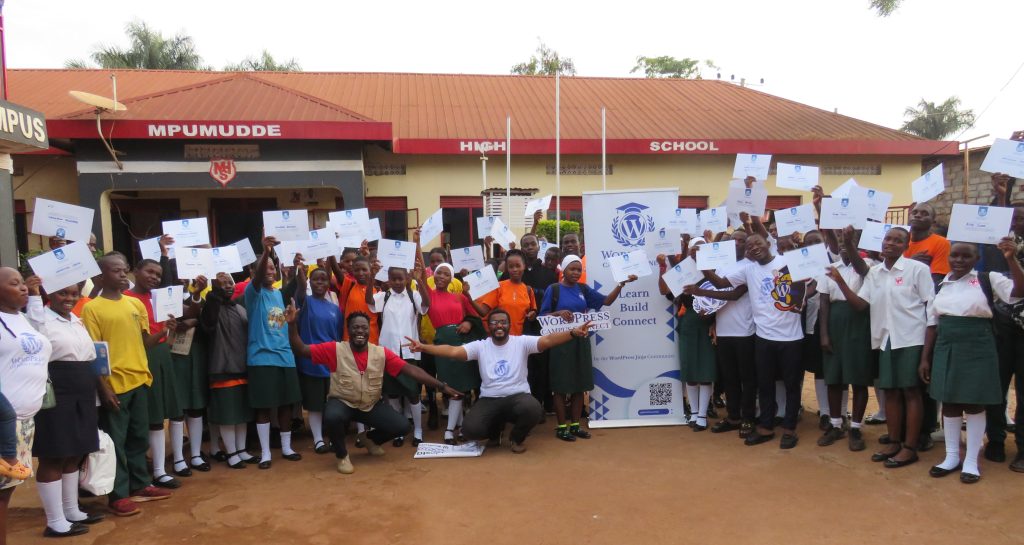
Bringing WordPress and Web Design Skills to Over 1,200 Students Across Eastern Uganda WPCC Jinja at Mpumudde High School Jinja Summary Over a five-month period (with a two-month holiday/national elections break) the WordPress Jinja community successfully piloted Africa’s first and largest WordPress Campus Connect program, reaching 12 schools and institutions across Eastern Uganda. Through hands-on workshops, mobile ICT labs, and student-led digital clubs, the initiative introduced 1,293 students and 81 educators to WordPress, open source, and practical digital skills. Designed to bring technology education directly into classrooms where opportunities are often limited, the program empowers young people to explore digital careers, build online portfolios, and connect with the global WordPress community. Despite a two-month holiday and national election break, along with national exams and national teacher strikes, the first edition of Campus Connect Jinja demonstrated how open-source learning and imparting of WordPress and web design skills can grow sustainable student communities and inspire the next generation of digital creators. Why Campus Connect? While WordCamps and meetups often bring together developers, designers, and professionals already working in technology, Campus Connect focuses on students who are just beginning their digital journeys. It creates opportunities for young people to encounter WordPress early, discover what open source means, and begin building skills that can shape their future. The launch of Campus Connect in Jinja builds on years of student-centered initiatives already taking place within the local WordPress community. From free web design hackathons for students to youth-focused workshops held alongside WordCamps, our local organizers have steadily worked to make technology education more accessible. Campus Connect represents the next step in that journey: a structured outreach program that connects schools directly with the global WordPress ecosystem while cultivating the next generation of open-source contributors. WPCC Jinja at Jinja Senior Secondary School Background When our WordPress Jinja community concluded WordCamp Jinja 2025 (our 4th WordCamp) hosted at Jinja Senior Secondary School, one moment stood out clearly: the enthusiasm of the students who had attended and participated actively. Their curiosity about WordPress, web publishing, and open-source technology revealed a powerful opportunity. What we had witnessed should not remain a one-time experience. From that realization, the idea of bringing the WordPress Campus Connect initiative to Jinja was born. Campus Connect is designed to bring WordPress directly into classrooms and learning spaces where opportunities in technology are often limited. The program focuses on introducing students to open source while equipping them with practical digital skills that can shape their future careers. Through the initiative, the WordPress Jinja community set out to: Introduce WordPress in classrooms where opportunities in technology are often limited Empower young people with hands-on digital skills that prepare them for careers Build sustainable student-led communities through clubs and ongoing activities Connect local talent with global contributors, creating new opportunities for mentorship and collaboration By meeting students where they are on their campuses and within their schools, Campus Connect ensures that WordPress communities will continue to grow long after the first workshops are completed. However, the vision quickly revealed a significant challenge. Many schools in and around Jinja lack access to functioning computer laboratories or digital infrastructure. Without computers, students would have little chance to explore WordPress, learn web publishing, or participate in the open-source ecosystem. Determined not to leave anyone behind, the WordPress Jinja community partnered with local ecosystem partners that could provide mobile ICT laboratories and laptops. With these resources, the community launched a five-month outreach program that brought WordPress training directly to schools across Eastern Uganda both with in-house labs and our mobile ICT labs from partners. By the end of the program, more than 1,200 students and educators across twelve institutions had participated, including schools serving learners with disabilities. The Jinja Campus Connect Model Each Campus Connect visit followed a structured learning model designed to combine technical training, digital literacy, and career exploration. All sessions included: Introduction to WordPress and the open-source ecosystem Hands-on website creation and content publishing Digital storytelling and blogging Responsible digital citizenship and online safety Career pathways including freelancing, entrepreneurship, and digital work Every visit concluded with the formation of a Student-Led WordPress and Digital Skills Club within the host institution. These clubs serve as satellite communities connected to the WordPress Jinja Meetup, ensuring that the learning continues long after the workshops end. Over time, the clubs will become fully integrated within their schools according to institutional guidelines and eventually organize their own student-led WordPress activities. Through these clubs, Campus Connect plants the seeds of sustainable local communities that can continue learning, collaborating, and contributing to open source. Google Photos Link: Our Journey of Impact: Campus by Campus Highlights 1. Macedonian Vocational Institute Macedonian Vocational Institute, Jinja – 102 Students and 5 Teachers – 4th October 2025 At Macedonian Vocational Institute, the session centered on the practical value of WordPress for vocational and entrepreneurial careers. Students explored how websites and online portfolios can help artisans, technicians, and young professionals present their skills, attract clients, and grow their businesses. Through hands-on demonstrations, participants were introduced to web design, content creation, and the basics of WordPress development, while also learning how open-source tools can create opportunities beyond the classroom. A student WordPress club was further strengthened during the visit to support continued practice and portfolio building. 2. Jinja Senior Secondary School Jinja SSS – 253 Students and 6 Teachers – 9th and 11th October 2025 Jinja Senior Secondary School, which hosts more than 5,000 students, served as the launch point for the Campus Connect outreach program. Across two engagement sessions, an introductory session and a deeper hands-on session, students were introduced to WordPress fundamentals, website creation, blogging, and the wider culture of open-source collaboration. They explored web design, digital storytelling, and creative publishing while also gaining exposure to WordPress development concepts. The visit concluded with the establishment of a student WordPress satellite community that will eventually become a student club, led by student coordinators from the school leadership and Science and ICT Club, who will guide blogging activities and peer

WordCamp Central: WordPress Campus Connect Jinja 2025 Recap: Piloting Africa’s First and Largest Campus Connect Program Across 12 Campuses in Eastern Uganda Lire la suite »

WPTavern: #209 – Simon Pollard on Navigating the New Normal for WordPress Community and Events

Transcript [00:00:19] Nathan Wrigley: Welcome to the Jukebox Podcast from WP Tavern. My name is Nathan Wrigley. Jukebox is a podcast which is dedicated to all things WordPress. The people, the events, the plugins, the blocks, the themes, and in this case, trying to navigate the new normal for WordPress community and events. If you’d like to subscribe to the podcast, you can do that by searching for WP Tavern in your podcast player of choice. Or by going to wptavern.com/feed/podcast, and you can copy that URL into most podcast players. If you have a topic that you’d like us to feature on the podcast, I’m keen to hear from you and hopefully get you or your idea featured on the show. Head to wptavern.com/contact/jukebox and use the form there. So on the podcast today we have Simon Pollard. Simon has been building with WordPress for many years. Originally from Devon in England, he’s worked as a professional web developer across locations, eventually landing at Illustrate Digital, where he’s been for six years. Simon’s not just a coder. He’s been deeply involved in the WordPress community, not only organising, but helping to grow the Bristol WordPress Meetup from a casual get together in a pub, to a thriving, officially backed event with dozens of regular attendees. Like many in the WordPress ecosystem, Simon wears multiple hats. He’s a musician, a devoted dad, and an accidental community leader who found himself at the heart of local WordPress organising. But COVID-19 changed all that. In today’s episode, Simon explains what happened to WordPress Meetups during and after the pandemic. How vibrant communities fizzled out. How hard it was to bring people back. And the new challenges of connecting when traditional social media platforms no longer bring everyone together. Simon talks about his own journey, how he paused on events, shifted his social life to music, and struggled to hand the Meetup keys to new organisers. Eventually, a call from an old friend drew him back and he was faced with the new reality. Smaller groups, fractured channels, and the question of how to keep the in-person spirit of WordPress alive. We get into the irreplaceable value of real life connection, the warmth in the room, and the need to rethink what gets people to in-person events now. Is it hybrid events? Perhaps it’s music? Something beyond pure WordPress talks? We discuss what’s been lost, what still matters, and what it might take to build the new era of WordPress community in a distracted, always connected, world. If you’re curious about the future of WordPress Meetups, if you felt the ebb and flow of community during the past few years, or if you just want to know how to find your people again, this episode is for you. If you’re interested in finding out more, you can find all of the links in the show notes by heading to wptavern.com/podcast, where you’ll find all the other episodes as well. And so without further delay, I bring you. Simon Pollard. I am joined on the podcast by Simon Pollard. Hello Simon. [00:03:42] Simon Pollard: Hello Nathan. [00:03:43] Nathan Wrigley: Very nice to chat. Simon and I have met for the first time, just sort of 10 minutes ago. We’ve had a little bit of a chat. And as is so often the case, Simon has a musical instrument in the background. I don’t know what that is, but there’s definitely a thing there. WordPressers often have musical instruments. [00:03:57] Simon: There’s more behind me as well. And randomly, I’ll bring in another fact, so I’m in a very casual band of predominantly mid forties internet developing type people. And, yeah, we’re all the same, we all play instruments. And randomly we all, without being connected in any way, can work in the same one building in Bristol, which is co-working in individual offices and we all found out we’re all in the same building. And that wasn’t how we met. [00:04:21] Nathan Wrigley: I think probably anybody listening to this has figured out by your accent that you’re from the UK. And you mentioned Bristol just there. [00:04:27] Simon: Well, Brizzle if I’m going to be correct. [00:04:29] Nathan Wrigley: Right at the top of the podcast, we typically ask the guests to just give us a little potted bio, a moment or two just telling us who you are. And as it’s a WordPress podcast, just give us your background with WordPress, I guess, as well. [00:04:40] Simon: Yeah, well, I’m from Devon originally, which the English people will pick up on the accent potentially. I try to hide that away, but every now and again a little bit of farmer will come out and it’ll be oh, argh. And then, yeah, so I was born in Devon, moved away into to Cheltenham, been to Cardiff and then ended up in Bristol and worked at various places amongst all of them. Bristol was where I finally got my kind of proper web job, an actual proper official web job. And the first company I started used WordPress as one of the platforms, and that’s from where I started off my kind of professional career. Moved around a few places since then as developers do, but always kind of staying in the area. And then currently, I am now at Illustrate Digital. Been there for six years, joined at the start of 2020, so that was an interesting progression, we’ll cover that later. During my time in Bristol, it was someone else who originally raised the idea of a Meetup for of WordPress devs to kind of meet up and have a chat. So myself and a few others met up with this one guy called Henry, and we just met at the pub, sat around a table and had a chat and said, what are you doing? What do you need help with? What would we like to talk about? And it


WPTavern: #209 – Simon Pollard on Navigating the New Normal for WordPress Community and Events Lire la suite »