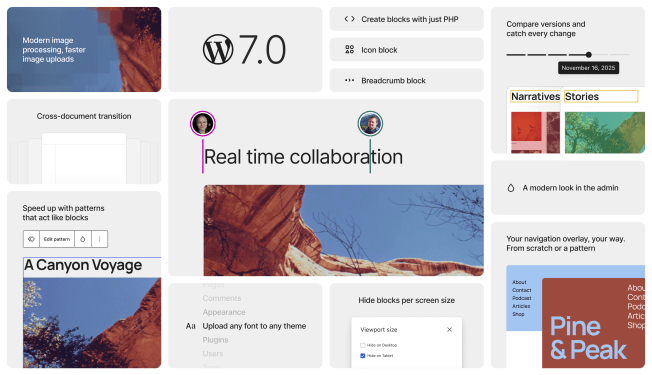
Hi, In less than two weeks, WordPress 7.0 is scheduled to be released. Are you ready? Or are you someone I used to be who waits two to three weeks to see what quirks early adopters find and if they warrant an early point release? Be that as it may, waiting only delays the inevitable, though, sooner or later you get to benefit from the new features and quality of life improvements to the Admin, Editor and Blocks. The first version of the WordPress 7.0 Source of Truth has been published. It’s again a mammoth post of 4500 words, including 21 images and ten videos. I hope you enjoy the list of all the big and small feature and updates. Next week, I will be on my way to Mumbai. The next weekend edition will arrive in your inbox after WordCamp Asia, on April 17th, 2026. Yours, Birgit PS: Should you be in Mumbai, grab a coffee of lunch spot from my public calendar, I’d love to meet you! WordPress 7.0 WordPress 7.0 Release candidate 1 was moved to this week. The WordPress 7.0 RC2 was still on schedule for Thursday, though. Meanwhile, more Dev Notes were published. Pattern Overrides in WP 7.0 is your heads-up to act before the release lands. WordPress 7.0 lifts the old restriction — Pattern Overrides now work with any block attribute that supports Block Bindings, not just a hardcoded Core block list. You opt in via the block_bindings_supported_attributes filter, and the post walks you through edge cases for static blocks where a render_callback may still be needed. Pattern Editing in WordPress 7.0 explains that ContentOnly mode for unsynced patterns is now the default, meaning block structure and style controls are hidden from editors by default. Block authors need to audit « role »: « content » attributes in block.json, theme authors should test their patterns, and plugin developers should verify UI components still render correctly under the new, more broadly applied editing modes. Block Visibility in WordPress 7.0 dev note is relevant if your theme or plugin touches block markup server-side. The new viewport key inside blockVisibility metadata lets users show or hide blocks per device — mobile, tablet, desktop — via CSS, not DOM removal. If your code assumes blockVisibility is always a boolean, you’ll need to update it to handle an object too. No changes are needed if your blocks don’t interact with markup server-side. Anne McCarthy walks through one of WordPress 7.0’s most-requested features: viewport-based block visibility. You’ll see exactly how showing or hiding any block by screen size works in practice — no extra plugins or CSS workarounds needed — and why it is relevant for responsive design. If you’ve been waiting for a native way to tailor content for mobile, tablet, and desktop separately, this is your preview before the April 9th release. The Dimensions Support Enhancements in WordPress 7.0 comprise width and height as first-class block supports. Block builders and theme designer opt in with a single line in block.json, set defaults in theme.json, and the sidebar UI comes for free. Themes can also define named dimensionSizes presets, giving users a consistent palette rather than free-form inputs. If your block has custom width/height attributes today, this is a good moment to consider migrating. A long-requested feature finally lands in WordPress 7.0. The dev note on Custom CSS for Individual Block Instances hold all the details. The new customCSS block support — enabled by default for all blocks — adds a Custom CSS field in the Advanced panel of the block inspector, scoped automatically to that instance via a generated class. Block authors whose blocks wrap raw or opaque content should explicitly opt out via block.json. If your render_callback is in play, make sure your block’s outermost element is a standard HTML tag. A typography feature requested since 2021 finally arrives in WordPress 7.0, the dev note on the new textIndent block support has all the details for developers working on blocks or themes. Opt in with a single line in block.json, and a Line Indent control appears automatically in the Typography panel. Theme authors get theme.json configuration too, including a thoughtful subsequent vs all toggle that respects both LTR and RTL typographic conventions. No breaking changes — purely additive./ WordPress 7.0 ships a new Connectors API — and if you build AI-adjacent plugins, this dev note belongs on your reading list. The new framework standardizes how WordPress registers and manages connections to external services — starting with AI providers — giving you a consistent admin UI, API key management, and auto-discovery via the WP AI Client. Three providers ship out of the box: Anthropic, Google, and OpenAI. The wp_connectors_init action is your hook for registering additional connectors or overriding existing metadata. Felix Arntz details the new AI Client landing in WordPress 7.0 — a provider-agnostic PHP API that lets your plugin send prompts for text, images, speech, or video without touching credentials or provider logic. You chain methods on wp_ai_client_prompt(), declare model preferences, and WordPress routes to whatever the site owner has configured. Three official provider plugins cover Anthropic, Google, and OpenAI. Client-side JS exists but remains admin-only for now. Jorge Costa details the client-side Abilities API arriving in WordPress 7.0, the JavaScript counterpart to the PHP Abilities API introduced in 6.9. Two new packages handle it: @wordpress/abilities for pure state management and @wordpress/core-abilities for the WordPress integration layer that auto-fetches server-registered abilities via REST. You can register abilities with input/output schemas, permission callbacks, and annotations — laying the groundwork for browser agents and WebMCP integration. Gutenberg 22.8 Gutenberg 22.8 release lead Dean Sas highlighted in his post What’s new in Gutenberg 22.8? (25 March) the following features: Real-time Collaboration improvements Button pseudo-state styling in Global Styles Site Logo & Icon in the Design panel Connectors extensibility Other Notable Highlights The real-time collaboration improvements and the Connectors extensibility will make it into the WordPress 7.0 release. I had a blast chatting with Beth Soderberg from Bethink Studio on the recording of