Non classé

#201 – Marc Benzakein on How Life Has Changed During the Internet Era

Transcript [00:00:19] Nathan Wrigley: Welcome to the Jukebox Podcast from WP Tavern. My name is Nathan Wrigley. Jukebox is a podcast which is dedicated to all things WordPress, the people, the events, the plugins, the blocks, the themes, and in this case how life has changed during the internet era. If you’d like to subscribe to the podcast, you can do that by searching for WP Tavern in your podcast player of choice, or by going to wptavern.com/feed/podcast, and you can copy that URL into most podcast players. If you have a topic that you’d like us to feature on the podcast, I’m keen to hear from you and hopefully get you, or your idea, featured on the show. Head to wptavern.com/contact/jukebox, and use the form there. So on the podcast today, we have Marc Benzakein. Marc’s story is one that spans nearly the entire history of the internet, with roots reaching back to the mid nineties. He explores, how curiosity and an enthusiastic embrace of technology led him from running a small coffee importing business, accepting payments by snail mail, fax, then email, to helping wire up schools for internet access when modems worked incredibly slowly, and only a handful of people were online. This episode is a departure from our usual topic about plugins, themes, and WordPress community news. Instead, we are more in the business of reminiscing this week, taking a reflective walk down memory lane to look at how the internet has evolved, not just as a technology, but as an integral part of society that’s transformed how we work, communicate, and think. Marc shares some personal stories, building bulletin board systems, forging long distance friendships over phone lines and slow modems, and watching as internet access shifted from an intentional, difficult to navigate hobby for a few, to an invisible always on utility that we all take for granted. We talk about how technology has affected not only business and productivity, often creating more work instead of less, but also our attention spans, expectations around entertainment, the pace of life, and even the social fabric that binds us together. We discuss the cultural shifts that came with always connected living, digital minimalism, and the recent push by younger generations to step back from tech and reclaim a bit of analog life. We chat about the early optimism of open standards, the rise of walled gardens and social networks, and the challenges of regulation, commercialisation, and the balancing act between freedom and responsibility online. Marc’s perspective is shaped by decades of direct technical experience, as well as thoughtful observations of how technology is reshaping the world around us, sometimes for the better, sometimes in ways we need to pause and question. Whether you are nostalgic for the old days of dial up, intrigued by how the internet’s culture has shifted, or curious about how these transformations might play out as new technologies like AI reshape society, this episode is for you. If you’re interested in finding out more, you can find all of the links in the show notes by heading to wptavern.com/podcast, where you’ll find all the other episodes as well. And so without further delay, I bring you Marc Benzakein. I am joined on the podcast by Marc Benzakein. Hello, Marc. [00:03:44] Marc Benzakein: Hello, Nathan. How are you? [00:03:45] Nathan Wrigley: Yeah, good. This is going to be an episode unlike one I think we’ve ever done on the WP Tavern podcast. Because usually we have a conversation about, I don’t know, a plugin, a theme, a community idea, something along those lines. And today we’re just going to do memory lane. We’re going to go hand in hand down memory lane. I think Marc’s memory lane is a little bit longer than my memory lane because it’s all about the internet and the way we’ve been using it and how it’s evolved and all of that. So if you’ve got an expectation of a plugin show, this is not the one for you. This is going to be a little bit different. So before we crack in properly and have that conversation, Marc, would you just sort of paint the picture a little bit about your bio? Maybe go back right to the beginning of your experiences on the internet. When did you first get online and all that kind of stuff? [00:04:30] Marc Benzakein: So I want to go back to, I think it was 1995 or 1996. There was a, of course people hear about, and it still exists, AOL and things like that. And then there was Prodigy. I got involved as a user of the internet with a company called Netcom. And it was kind of one of the first true internet service providers that I knew of at the time. It wasn’t like, it didn’t have like this interface and kind of guide you through where you needed to go and everything. You had to use things like Gopher, and you had to do research in order to be able to use the internet. I of course, became fascinated with it always being a, kind of a tech head or just curious. I’m just infinitely curious. It doesn’t really matter, it doesn’t have to be technology. It can be anything and I find it, like I said, I’m infinitely curious and that leads to distractions sometimes, but it also leads me down paths that I never would’ve thought. And while I was working on the internet, so this was at a time that I was actually importing coffee from Africa. So yeah, so related. So related. And I had actually made some pretty good money with the coffee business. I was doing the email thing. I had like my three friends who had email addresses and we were like, oh, this is cool. Look at this, instant gratification. And I thought, man, it sure would be cool to see what this looks like from the other

#201 – Marc Benzakein on How Life Has Changed During the Internet Era Lire la suite »
WordPress.org blog: Be Part of WordCamp Asia 2026

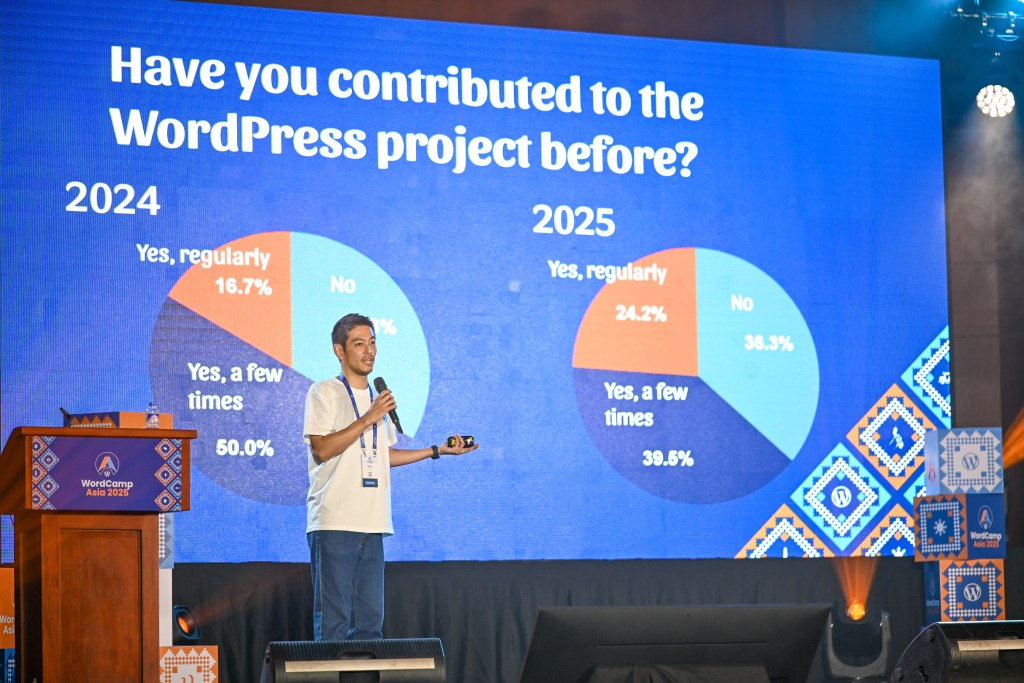
WordCamp Asia is back in 2026, this time in Mumbai, India, and it’s building on a year that showed just how ambitious and connected the WordPress community has become. Now is the time to get involved. Get your ticket, explore sponsorship opportunities, and help spread the word. Get Your Event Pass Become a Sponsor About WordCamp Asia In 2025, more than 1,400 attendees from 71 countries gathered in person, with nearly 15,000 more joining online for WordCamp Asia 2025. With notable guests like WordPress Co-founder Matt Mullenweg and Gutenberg Lead Architect Matías Ventura, and a diverse lineup of speakers and panelists from across the ecosystem, WordCamp Asia 2025 brought together a community actively shaping the future of the open web. It’s the people. It’s the friendships and the stories. Matt Mullenweg, WordPress Cofounder WordCamp isn’t just about sessions and schedules. It’s about connection. It’s about learning directly from people who are building, scaling, and sustaining WordPress in the real world. It’s about sharing ideas, debating the future of the open web, and leaving with renewed energy for the work ahead. And in 2026, that spirit returns stronger than ever. Tickets for WordCamp Asia 2026 are on sale now, and this is the moment to secure your spot. WordCamps are intentionally priced to remain accessible, and early ticket sales help organizers plan an inclusive, high-quality experience for everyone. Join 3,000+ Web Professionals April 9 – 11, 2026 | Jio World Convention Centre, Mumbai, India Get Your Event Pass WordCamp Asia is also made possible by the organizations that step up to support it. Sponsorship plays a critical role in keeping the event accessible, supporting contributors and volunteers, and ensuring the experience reflects the values of the WordPress project. For sponsors, WordCamp Asia 2026 offers a rare opportunity to connect with a highly engaged, global audience in a setting built on trust, collaboration, and shared purpose. Sponsorship packages are designed to support a wide range of organizations, from local companies to global businesses building products and services on WordPress. Beyond visibility, sponsors become part of the story—helping sustain the ecosystem and invest directly in the community that makes WordPress possible. If your company is interested in becoming a sponsor or you would like to know more, please reach out. Become a Sponsor At every level, WordCamp Asia is powered by people. Organizers, volunteers, speakers, sponsors, and attendees all contribute to an experience that reflects WordPress’s shared values of openness and collaboration. It’s a place where new voices are welcomed, long-time contributors reconnect, and ideas move from conversation to action. WordCamp Asia 2026 is more than an event—it’s a moment to come together, reflect on where we are, and help shape what comes next. Whether you’re attending for the first time, returning for another year, or supporting the event as a sponsor, your involvement helps strengthen the WordPress ecosystem and the global community behind it. We’ll see you in Mumbai.

WordPress.org blog: Be Part of WordCamp Asia 2026 Lire la suite »

Matt: Cancer Founder Mode

Sid Sijbrandi, a friend and a former CEO of Gitlab, has started to share some of the story of his journey with cancer. Manager mode assumes that existing systems will surface the best options. When I was first diagnosed with cancer in 2022, I delegated the crucial analyses and decisions about my care to others. In late 2024, when my cancer reappeared and my doctors told me I had exhausted the standard of care and there were no trials for my situation, I realized that assumption might, quite literally, kill me. Founder Mode was my only option. Founder Mode meant going deep on every diagnostic and treatment option. It meant assembling a team of physicians and scientists to work from first principles to understand what was possible beyond standard protocols. Together, we paved new roads to access the very cutting edge of science and technology. Today, thanks to the efforts of many people around the world and the support of my wife Karen, I currently have no evidence of disease. Sid was already very inspiring before this journey, and this is especially impressive. Elliot Hershberg has the full story and analysis, including some predictions for the future of cancer treatment.

Matt: Cancer Founder Mode Lire la suite »

WordPress.org blog: A New Home for WordPress Education Programs

Over the past few weeks, a new space has taken shape on WordPress.org for students who want to learn, build, and contribute. WordPress Education programs bring together initiatives that help students enter the WordPress ecosystem through clear, accessible entry points that lead to real-world practice. With hands-on initiatives and supportive communities, participants can grow new skills and take their first steps as contributors. Across campuses and communities worldwide, learners publish real projects, build practical experience, and gain confidence as part of open source creation. CC0 licensed photo by Virendra Kumar Yadav from the WordPress Photo Directory. A clearer path into the WordPress ecosystem WordPress Education is designed to help students turn knowledge into practice, discover their strengths, and understand how their contributions can make a real impact through three core programs: WordPress Campus Connect, WordPress Credits, and WordPress Student Clubs. Through hands-on campus events, such as WordPress Campus Connect, on-campus groups like WordPress Student Clubs, and a practice-based program called WordPress Credits, participants can gain practical experience, publish real-world projects, and build confidence as contributors to a global culture of open-source creation. At its heart, these WordPress education programs are about three simple ideas: Learn. Build. Connect. This update brings WordPress education programs together in one place, with an easy way to explore initiatives, understand how they work, and take the next step. You will find: A home for WordPress Education programs and updates Clear “how to get involved” paths for students, educators, mentors, organizers, and sponsors Stories, highlights, and examples of real projects created through the programs Links to the Education Handbook for program guidelines and resources Want to learn more about WordPress education opportunities? Visit The Portal You can also view more information from the WordPress Community Education Programs Handbook. Learn how this serves as a central guide and resource for all community-driven educational initiatives. WordPress Campus Connect WordPress Campus Connect is a growing global learning initiative that brings hands-on WordPress learning directly to the students on their campus. The organizers can come from within educational institutions or from the local communities to help deliver WordPress programming and create the future stewards of WordPress. Learn more: https://wordpress.org/education/campus-connect/ WordPress Credits WordPress Credits is a contribution-based program by the WordPress Foundation that connects higher education students with the global WordPress community. Educational institutions partner with the WordPress Foundation to offer students credits toward their degrees for contributing 150 hours to the WordPress project. Learn more: https://wordpress.org/education/credits/ WordPress Student Clubs WordPress Student Clubs empower students to build on-campus WordPress communities that keep learning going throughout the year. In the spirit of our local community meetups, these groups operate as on-campus equivalents, keeping students engaged and connected with their local WordPress communities. Learn more: https://wordpress.org/education/student-clubs/ Support This Growing Movement Help spread the word, and let friends, students, and others know how they can contribute to this growing effort, including a widely expanding translation effort. WordPress Education has already been translated into 10 new languages. WordPress Education is powered by people who believe in open learning and the power of collaboration.

WordPress.org blog: A New Home for WordPress Education Programs Lire la suite »

Weston Ruter: Post Date Block: Published & Modified

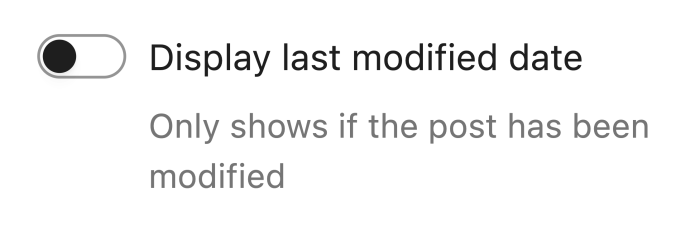
I’ve had an itch I’ve wanted to scratch for a while. A year ago, I re-developed my blog here to use the Twenty Twenty-Five block theme replacing the Twenty Twenty classic theme. Something I wanted to do was show a post’s published date followed by the modified date if it differed. For example, for WCUS 2024 I published My Portland Picks to share my favorite things to do in the city. Since WCUS 2025 was also in Portland last year, I updated the post with my latest picks. To make it clear it had been changed, I manually added a “Post updated for 2025” paragraph at the beginning of the post. But I wanted to avoid having to keep doing this for such evergreen content. There are two blocks listed in the block inserter for dates: Date and Modified Date. (Previously these block names started with “Post” but these were removed in WordPress 6.4.) In reality, these two blocks are just variations of the one Date block. You could turn a Date block into a Modified Date block by enabling this block setting: With block bindings in WordPress 6.9, the Date block became further abstracted to be able to represent any date, not just a post’s publish date or modified date. When a Date block is inserted, you can now decide to bind the block to either of these dates: The key word there is “either”. The setting I was looking for was missing: the ability to display the publish date and the modified date (if it differs). I did find Gutenberg issue #53099 opened by Carolina Nymark where she was reporting that it was confusing that the old “display modified date” toggle actually causes the modified date to be displayed instead of the publish date: The info I was looking for was whether, when toggled on, it would display both the published and modified dates, or display the modified date instead of the published date, as from the settings alone it’s not immediately clear Commenting on that issue, Ronnie Burt said: Feedback after using this block on multiple sites in templates for both posts and pages. The ‘modified date’ block doesn’t show anything if the post has never been updated. This makes it really challenging to use, as there will be a blank spot on the front end for new posts or pages without any edits. It would be more useful to show the date published if the post has no edits. Carolina responded: The problem is that there is no one scenario that will work for all use cases. Some users and designs wants to display both the original publishing date and the modified date. So no matter how this block is updated, it will break for someone. Your best option may be to register a block binding with a callback function that displays the post date, to get the exact conditions that you need, and then insert a paragraph with this block binding, instead of using the post date block. A few months later, when I discovered the issue, I commented: To me it seems like the block should facilitate showing the published date and then also show the modified date if it is different, with a prefix like “Updated: ” or some other parenthetical treatment. I don’t think the modified date should ever take over the published date. I’m not sure the best way to achieve that other than by adding a plugin which filters the Date block to append the desired content. I’m not sure how that could be handled in the UI, given we’re dealing with inline content and there is no ability to hide blocks (cf. #50756), and there’d have to be a condition like “Only show this block if the rendered date/time of the published date is not the same as the rendered date/time of the modified date.” So this is what I wanted, but the Date block didn’t support it. So I started exploring something that would implement my desired use case. Accounting for all the different scenarios adds complexity to the block. Rendering a single publish date or modified date is simple enough. But if the modified date needs to be displayed conditionally then how is this configured in the editor? Namely, if both dates are displayed, then one or both of the dates would need to have some prefix indicating what the date refers to. The two configurations I had in mind were prefixing the modified date only: December 25, 2025 (Modified: January 1, 2026) Or else putting each on a separate line and having prefixes for each: Published: December 25, 2025Modified: January 1, 2026 There is an existing Gutenberg issue #61920 which is about adding prefixes and suffixes to the block similarly to the Categories block. But these prefixes are unconditional for only a single date. I wanted these prefixes added conditionally for when the modified date is displayed in addition to the published date. A New Plugin Ultimately, I put together a plugin to implement what I wanted: Post Date Block: Published & Modified. It’s currently on GitHub but I’ve also submitted it to the WordPress.org directory. Once active, when you are editing the settings for the Date block for the Post Date variation, a new “With Modified Date” panel appears. Inside that panel there is a new toggle: Show modified date when different from published date The two dates are rendered in the supplied date format, and only if they then differ will the modified date be displayed after the published date. This prevents the modified date from appearing as a duplicate when the post is updated on the same day it was published. When that toggle is enabled, two new sets of fields are presented for adding a prefix and suffix to both the published date and the modified date. There is also a toggle for whether the modified date should be displayed on a separate line. Here are the settings for the two

Weston Ruter: Post Date Block: Published & Modified Lire la suite »

Matt: AI Psychosis

One of the most concerning trends I’ve seen is that, as people adopt AI, it captures those for whom it was designed. That previous sentence went through several revisions at various layers of intelligence… the spell-checker, grammar-checker, Grammarly, Harper, maybe more, all attacking the words that spill from my divine intelligence and then interact with yours. Anthropic has published a really interesting essay and paper, The assistant axis: situating and stabilizing the character of large language models. You need infoguards to protect your mind. Sam Altman was prescient in 2023 when he said, i expect ai to be capable of superhuman persuasion well before it is superhuman at general intelligence, which may lead to some very strange outcomes Some very smart and talented friends are going down rabbit holes that don’t have good ends. My world is small; when you extrapolate this out to the 800M+ MAUs of ChatGPT, there’s probably a lot of weird stuff happening out there. We live in the most interesting times.

Matt: AI Psychosis Lire la suite »

How to Automate WordPress Forms With n8n – Save Hours of Manual Work

I used to spend hours each week moving data from WordPress forms into other tools. I would copy an email address here, paste a phone number there, create a task, and then send a follow-up. It was slow, and I knew there had to be a better way. Then I discovered the power of workflow automation. WPForms can work with n8n, which means you can send your form entries to thousands of apps using n8n’s workflows and automate what happens after someone submits your form. This means no more manual data entry, forgotten follow-ups, or wasted time on repetitive tasks. In this guide, I’ll show you how to connect WPForms with n8n and create automated workflows that save you hours every week. If you’re ready to work smarter, not harder, let’s get started! TL;DR: In this guide, you will learn how to connect WPForms with n8n to automate your daily tasks. I will show you how to set up the integration and create workflows that instantly send form data to your favorite apps, saving you hours of manual work. Here’s what I cover in this article: What Is n8n? How to Build Your Workflow in n8n Integrate WPForms with n8n for Powerful Automation Testing and Finalizing Your Automated Workflow Frequently Asked Questions About Automating Forms With n8n Additional Resources for WordPress Forms and Automation What Is n8n? n8n is a powerful workflow automation tool that acts as a bridge between your WordPress site and other apps. Think of it as a digital assistant that takes data from one place (like your contact form) and instantly delivers it to another (like Google Sheets or Slack). Unlike simple plugins that might only connect to one specific service, n8n allows you to build complex workflows. This means a single form submission can automatically trigger a chain of actions across different apps. Related Post: How to Add n8n-Like Automation in WordPress Why Automate Your Forms With n8n? Manually copying data from emails to spreadsheets or CRMs takes unnecessary time and effort. Automating your forms with n8n eliminates this busy work. Here are the biggest benefits of using n8n with WPForms: Save Time: Automation handles repetitive data entry instantly, freeing you up to focus on growing your business. Eliminate Human Error: Manual copying from data often leads to typos and other errors. n8n transfers your data exactly as it was entered, every single time. Data Privacy: Because n8n can be self-hosted on your own server, you keep full control over your customer data. This is a huge advantage over other cloud-only tools. Complex Workflows: You aren’t limited to simple ‘A to B’ connections. You can filter data, format it, and send it to multiple tools simultaneously using n8n’s visual editor. In short, using n8n with WPForms gives you the power to build custom automations that fit your specific needs, rather than forcing you to adapt your business to a rigid set of tools. Whether you are a beginner or a developer, it offers the flexibility to handle almost any task you throw at it. n8n vs. Other Automation Tools You might be familiar with other automation tools like Zapier or Make.com. While they all serve a similar purpose, n8n stands out in a few key areas. Here is a quick comparison to help you decide: Feature n8n Zapier / Make Hosting Cloud or Self-hosted (Your server) Cloud Only Cost Free (Self-hosted) or Paid Cloud Subscription (Can get expensive) Data Privacy Full Control (Self-hosted only) Data stored on their cloud Flexibility High (Custom code & complex logic) Medium (Linear workflows) Related Guide: How to Set Up Make.com-Like Automation in WordPress What You Need to Get Started Ready to start automating? Here is the checklist of what you will need for this tutorial: WPForms Pro License: The n8n integration is a premium addon, so you will need WPForms Pro or higher. WPForms Plugin: Ensure you have installed WPForms version 1.9.8.1 or newer. n8n Account: You can sign up for a 14-day free trial on n8n.io, or install the self-hosted version on your own server for free. Once you have these items ready, we can move on to setting up the connection. How to Build Your Workflow in n8n Now that you understand how n8n works, let’s start building your first automated workflow. I’ll walk you through each step of setting up n8n to receive data from your WordPress forms. Step 1: Accessing the n8n Dashboard First, you need to log in to your n8n account. Head over to n8n.io and sign in with your credentials. Once you’re logged in, you’ll see the n8n dashboard. This is where you’ll create and manage all your workflows. To start building a new workflow, click the ‘Start from scratch’ button. This opens the workflow editor where you’ll build your automation. Step 2: Creating a New Automated Workflow In the workflow editor, you’ll see a canvas with a ‘+’ icon. Click this icon to add a new node to your workflow. A panel will open showing available apps and triggers. In the search bar, type ‘WPForms’ to find the WPForms Trigger option. When you see WPForms Trigger in the search results, select it. You’ll need to click the ‘Install node’ button to add this trigger to your n8n account. After the installation completes, click ‘Add to workflow’ to insert the WPForms Trigger node into your workflow. This node listens for form submissions on your WordPress website and starts your automation whenever someone submits a form. Step 3: Configuring WPForms Triggers in n8n Once you add the WPForms Trigger node, it will open automatically, showing its configuration settings. If it doesn’t open, simply click on the node to view its settings panel. Click on the ‘Parameters’ tab at the top of the settings panel. Here, you’ll find the webhook configuration that connects n8n to your WordPress site. Look for the ‘Webhook URLs’ section and click to expand it. Inside, you’ll see two tabs: Test URL and Production URL. Open the ‘Production URL’

How to Automate WordPress Forms With n8n – Save Hours of Manual Work Lire la suite »