Non classé

Matt: AI Disruption

Two interesting posts today, first is Nick Hamze, who ponders the case on his delightfully avant-garde site for how WordPress fits in when everything is coded up on a whim, Nobody Rips Out the Plumbing. Separately, I was delighted to see that legendary investor Brad Feld has hooked up Claude Code to post to his WordPress site, which hammers in Nick’s point that when you can use these tools on top of existing infrastructure, you get a much stronger foundation than imagining everything from scratch.

Matt: AI Disruption Lire la suite »

Dennis Snell: HTML API: Check for unclosed attributes.

Today someone was discussing the goal of linting HTML, specifically of detecting unclosed attributes. Consider the following snippet: <p class= »important><img src= »alert.png »>This is important!</p> It’s clear that a mistake led to a missing double-quote on the class attribute of the opening <p> tag. While WordPress’ HTML API doesn’t directly report this (because “unclosed attribute” isn’t particularly an HTML concept), it can be used to roughly detect it. Here’s how to use the public functionality of the HTML API to detect unclosed attributes. To do this, we have to define what an unclosed attribute means. For the sake of brevity we will assume that if an attribute value contains HTML-like syntax it is probably unclosed. We might be tempted to start with something like this: <?phpforeach ( $processor->get_attribute_names_with_prefix(  » ) as $name ) { $value = $processor->get_attribute( $name ); if ( ! is_string( $value ) ) { continue; } $checker = new WP_HTML_Tag_Processor( $value ); if ( $checker->next_tag() ) { throw new WP_Error( ‘Found tag syntax within attribute: is it unclosed?’) }} This approach does get pretty far, but it suffers from the fact that it’s checking decoded attribute values, meaning it will detect false positives on any attribute which discusses tags, such as alt= »the &lt;img&gt; tag is a void element ». It’s better to review the raw attribute value instead of the decoded attribute value. A sneaky trick hidden in attribute removal The Tag Processor tracks attribute offsets but doesn’t expose them, even to subclasses. The HTML API tries really hard to avoid exposing string offsets! and it does this for good reason. String offsets are easy to misuse, are unclear, and finicky. However, the Tag Processor does allow subclasses to access its lexical_updates, which is an array of string replacements to perform after semantic-level requests have been converted to text. We can analyze these updates after requesting to remove an attribute; that will return knowledge about all of the places where that attribute and any ignored duplicates appeared in the source document. This approach also leans on the fact that static methods of subclasses have access to protected properties of the parent class. This is risky code and should be used with extreme caution, code review, and shared understanding among those who will be asked to maintain it. <?phpclass WP_Attribute_Walker extends WP_HTML_Tag_Processor { public static function walk( $html ) { $p = new WP_HTML_Tag_Processor( $html ); while ( $p->next_tag() ) { $names = $p->get_attribute_names_with_prefix(  » ); foreach ( $names as $name ) { $p->remove_attribute( $name ); $updates = $p->lexical_updates; $p->lexical_updates = array(); $i = 0; foreach ( $updates as $update ) { $raw_attr = substr( $html, $update->start, $update->length ); $quote_at = strcspn( $raw_attr,  » »‘ ); $might_be_unclosed = false; if ( $quote_at < strlen( $raw_attr ) ) { $raw_value = substr( $raw_attr, $quote_at + 1, strrpos( $raw_attr, $raw_attr[ $quote_at ] ) – $quote_at – 2 ); $checker = new WP_HTML_Tag_Processor( $raw_value ); $might_be_unclosed = $checker->next_tag() || $checker->paused_at_incomplete_token(); } yield $p->get_token_name() => array( $name, array( $update->start, $update->length ), 0 === $i++ ? ‘non-duplicate’ : ‘duplicate’, $might_be_unclosed ? ‘contains-tag-like-content’ : ‘does-not-contain-tag-like-content’, substr( $html, $update->start, $update->length ), ); } } } }} This WP_Attribute_Walker::walk( $html ) method steps through each tag in the given document and returns a generator which reports each attribute on the tag, as well as some meta information about it. $meta === array( ‘class’, // parsed name of attribute array( 3, 27 ), // (offset, length) of full attribute span in HTML ‘non-duplicate’, // whether this is the actual attribute or an ignored duplicate ‘contains-tag-like-content’, // likelihood of being unclosed ‘class= »important><img src= »‘, // full span of attribute in HTML); How to use this walker <?php$html = ‘<p class= »important><img src= »alert.png »>This is important!</p>’;foreach ( WP_Attribute_Walker::walk( $html ) as $tag_name => $meta ) { echo « Found in <{$tag_name}> an attribute named ‘{$meta[0]}’n »; echo  » @ byte offset {$meta[1][0]} extending {$meta[1][1]} bytesn »; echo  » it is a {$meta[2]} attribute on the tagn »; echo  » its value {$meta[3]}n »; echo  » `{$meta[4]}` »;} The output here tells us what we want to know: Found in <P> an attribute named ‘class’ @ byte offset 3 extending 27 bytes it is a non-duplicate attribute on the tag its value contains-tag-like-content `class= »important><img src= »`Found in <P> an attribute named ‘alert.png »‘ @ byte offset 30 extending 10 bytes it is a non-duplicate attribute on the tag its value does-not-contain-tag-like-content `alert.png »` For normative HTML the values are not as surprising. In this case, the missing  » has been added to the class attribute. $html = ‘<p class= »important »><img src= »alert.png »>This is important!</p>’; Found in <P> an attribute named ‘class’ @ byte offset 3 extending 17 bytes it is a non-duplicate attribute on the tag its value does-not-contain-tag-like-content `class= »important »`Found in <IMG> an attribute named ‘src’ @ byte offset 26 extending 15 bytes it is a non-duplicate attribute on the tag its value does-not-contain-tag-like-content `src= »alert.png »` Summary This code is not meant to be normative; it’s probably missing important details. It’s here to demonstrate one way we can take advantage of the already-available aspects of the HTML API to perform more interesting work. In this case, we can tug at some of its internals to build linting and reporting tools which investigate aspects not exposed in the public interface: duplicate attributes and raw attribute values. For the use-case of checking whether an attribute is closed or not, it’s a tricky problem to solve. We can only truly resolve this with a set of heuristics to determine the likelihood that an attribute isn’t closed, because HTML parsers will universally interpret any given string in a specific way, and regardless of errors, will produce tags and attributes from it. Before we reach for custom regular expressions (PCRE), we can look into the HTML API and consider the sliding scale of safety it presents to us; we can take advantage of the parsing it’s already performing to remove the need to replicate all of HTML’s complicated parsing rules in our custom code.

Dennis Snell: HTML API: Check for unclosed attributes. Lire la suite »

Matt: Leadership at the Peak

I want to start by thanking the Automattic board, and in particular General (Ret.) Ann Dunwoody, for encouraging me to step away from the endless work of being CEO of Automattic to focus on training and development. Ann, as one of this generation’s great leaders, did it herself before recommending it. She took the course shortly after becoming a four-star. The course was Leadership at the Peak from the Center for Creative Leadership, a nonprofit founded in 1970 by the family that invented Vicks VapoRub. As I reflect on all the corporate training I’ve had, from the first class they made me take at CNET 22 years ago because my title had manager in it, to the workshops or intensive CEO things I’ve been lucky enough to be exposed to later, there’s one thing that really stands clear: You get out of any program what you put into it. If you come in skeptical, distracted, or resentful, even if golden information is being dropped, it will bounce off you like water on a duck. You have to put yourself in a state of mind of extreme openness and enthusiasm, and take an earnest try at what the facilitators have designed and planned, no matter how cheesy, corny, obvious, or silly it might seem. Remember, their intention is for you to get something out of this, and they’ve done it before. Holding that state of openness is also a catalyst for the teacher; they light up when students are willing to trust the process, and they’ll give you their very best. I originally titled this post “Complete Surrender” because that extreme statement helps me step out of the part of my mind that is always trying to challenge authority, remix conventions, or think I’m cleverer than others. These programs are usually expensive, not just in dollars but in time you have to clear from other commitments, so don’t squander it by staying in your default modes of checking work, news, etc. Create a space for yourself to reflect, learn, and grow. It’s rare and precious. The caveat, of course, is to choose your teachers well. CCL has been doing this since the 70s; they’ve figured a few things out. They’re Lindy. All of these programs change and evolve over time; they’re not carved in stone, but it’s particularly interesting to see what survives when something has been going on for a long time. I’m also not religious about these things. I think of them as mental models that are new arrows in your quiver. You can use them as is, or, even better, mix them with something else you’ve learned to create something more useful and personalized to your context. The more you have, the more sturdy your latticework of understanding is, and the more robust your information framework will be when you encounter something novel. There’s also some luck in the group; a bad apple can throw off the week for everyone. My cohort had people from a variety of industries like healthcare, paper products, car rentals, and business process outsourcing from all around the world, including Egypt, Brazil, Saudi Arabia, and all across the US. It would have been easy for people to be guarded, but everyone really leaned in. I think we had so little network overlap that people felt more comfortable opening up. And, of course, it was endlessly fascinating to learn about the challenges across vastly different industries, as well as the universal commonalities that arise whenever you try to vector a group of humans towards a common goal. One of the inspirations I drew from Ann’s book, A Higher Standard, was the extent to which the Army invests in training and development, sometimes sending people to programs for years before they move into a new role. They’re always thinking about the next generation. A big theme for me in 2026 is learning: Last month at Automattic, we did our first two-week in-person AI Enablement intensive at our Noho Space, and the feedback was incredible. On the WordPress side, this year we’ll have thousands of college students enroll in our new WordPress Credits program to earn credits toward their degrees. The number of cities where WP meetups are held is on track to double; it’s clear people are hungry for opportunities to learn and grow. People have been asking my takeaways from the course, and it’s been hard to summarize, but I came away with big lessons on how my comfortable and improvisational presentation style can come off as not having a solid plan or being prepared, the importance of exercise and nutrition to have the energy you need as a leader, and the importance of being on time and what that signals to others. Great feedback is a gift and a mirror, allowing you to see things you might miss about how you show up to others. In the course, we made plans, and since then, I’ve been experimenting with integrating these learnings and others into my day-to-day. I feel like it’s really had an impact. So in closing, when you’re a busy executive, there’s never a good time to step away for a week, but I highly encourage every leader to at least once a year invest in themselves and let your colleagues and loved ones know that for a few days you’ll be really focused on a departure from your quotidian day-to-day and work on growth. It’s hard but worth it.

Matt: Leadership at the Peak Lire la suite »

8 Best AI Email Generators for Content Marketers (Based on My Testing)

Writing the perfect email can be one of the most challenging tasks for any marketer or business owner. I used to find myself staring at a blank screen, trying to come up with a catchy subject line or the right words to share my message, only to end up feeling frustrated. Most business owners can’t afford to spend hours on a single email. On the other hand, AI email generators can help you find the right tone, correct grammar, and even summarize your blog posts for newsletters. After testing multiple AI tools for content marketers and WordPress users, I’ve found the best AI email generators that are user-friendly and deliver readable results. In this guide, I’ll walk you through these top tools. Quick Overview of the Best AI Email Generators If you’re in a hurry, this quick overview table will help you quickly discover the best AI email generators for content marketers: Product Starting Price Best For Key Feature AIOSEO⭐️⭐️⭐️⭐️⭐️ $49.50/year Bloggers repurposing content Turns blog posts into marketing emails automatically FunnelKit Automations⭐️⭐️⭐️⭐️⭐️ $99.50/year WooCommerce store owners Creates personalized emails based on customer purchases Constant Contact⭐️⭐️⭐️⭐️⭐️ $12/month Beginners wanting all-in-one simplicity Writes and sends emails in one platform Brevo⭐️⭐️⭐️⭐️½ $9/month Multichannel marketing on a budget AI assistant for email, SMS, and WhatsApp Uncanny Automator⭐️⭐️⭐️⭐️½ $149/year Advanced WordPress automation Connects WordPress to OpenAI for custom workflows Instantly.ai⭐️⭐️⭐️⭐️½ $37/month Cold outreach and lead generation AI researches leads, writes personalized messages Grammarly⭐️⭐️⭐️⭐️⭐️ $12/month (billed annually) Writing across all platforms Drafts and rewrites content in 500,000+ apps Jasper⭐️⭐️⭐️⭐️½ $59/month Professional copywriters Unlimited AI words with brand voice matching Why Use AI to Write Emails? Artificial intelligence (AI) helps you write better emails faster, without starting from scratch every time. It removes the friction of staring at a blank screen while still letting you stay in control of the final message. Instead of spending hours drafting, editing, and second-guessing your wording, AI email tools give you a solid first draft in seconds. From there, you can tweak the tone, add a personal touch, and hit send. Here are the benefits of using an AI email generator: You save time on every campaign: AI handles the first draft, subject line ideas, and summaries, so you can focus on strategy instead of wording. You never start from a blank page: Even a rough prompt is enough to generate usable copy. This is especially helpful when you need to send emails regularly. You can reuse existing content: Blog posts, tutorials, and product updates can be turned into email newsletters automatically instead of being rewritten manually. You get clearer, more readable emails: Most AI tools help shorten long sentences, fix awkward phrasing, and keep your message easy to scan. You can adjust tone without rewriting: AI makes it easy to switch between friendly, professional, or urgent messaging depending on the situation. You can personalize at scale: Some tools write emails based on user behavior, like purchases or signups, without you creating dozens of versions by hand. I still treat AI as a starting point, not a replacement. I always review the draft, make sure the details are accurate, and add my own voice where it matters. Used this way, AI becomes a practical writing assistant rather than a shortcut. Why Generate Emails Directly From WordPress? WordPress makes email marketing easier because you already have the content, the audience, and the tools in one place. Here’s why generating AI emails directly in WordPress makes sense: No technical skills required. Most WordPress email tools use plain language prompts instead of complex coding. You already create content there. Your blog posts, product pages, and site updates live in WordPress, so turning them into emails should be just as easy. Integration with your existing tools. WordPress plugins can connect your email generator to forms, memberships, and online stores without extra platforms. You own your data. Unlike standalone services, WordPress keeps your subscriber information on your site or with your chosen email provider. Simple automation. Many WordPress plugins let you set up rules that automatically send emails when users take specific actions. If you’re not already using WordPress, then you’ll need a domain name and hosting for your website. For details, see our guide on how to create a WordPress website. My Proven Method for Testing AI Email Generators I tested these tools by creating real email campaigns that matched common content marketing scenarios. I wanted to see which ones saved time, produced readable results, and worked well for beginners. Setup and ease of use: I installed each tool to see how quickly I could generate my first email. Some worked inside WordPress, while others required account setup on external platforms. Writing quality and tone: I tested how natural the AI-generated text sounded. I checked if it could match different tones (professional, friendly, urgent) and whether the output needed heavy editing. Content repurposing speed: I measured how fast each tool could turn a blog post into an email summary. Tools like AIOSEO did this in seconds, while others required manual copying. Integration and automation: I checked which tools connected directly to email services or marketing automation platforms. I also tested if they could trigger emails based on user actions. Pricing and credit limits: I compared monthly costs and any usage limits. Some tools charge per email generated, while others offer unlimited use. Deliverability features: I looked for tools that help prevent emails from landing in spam folders, like authentication settings or spam-word checkers. This process helped me identify which tools are practical for everyday content marketers, not just the ones with the most features. Why Trust WPBeginner? At WPBeginner, we’ve been helping WordPress users build successful websites for over 17 years. Our team regularly creates email newsletters that reach millions of readers, so we understand what works in real email marketing campaigns. Every AI email generator in this guide has been tested thoroughly. We used them to write newsletter summaries, promotional emails, and automated follow-ups. Our recommendations are based on hands-on experience, not marketing claims. For more details on

8 Best AI Email Generators for Content Marketers (Based on My Testing) Lire la suite »

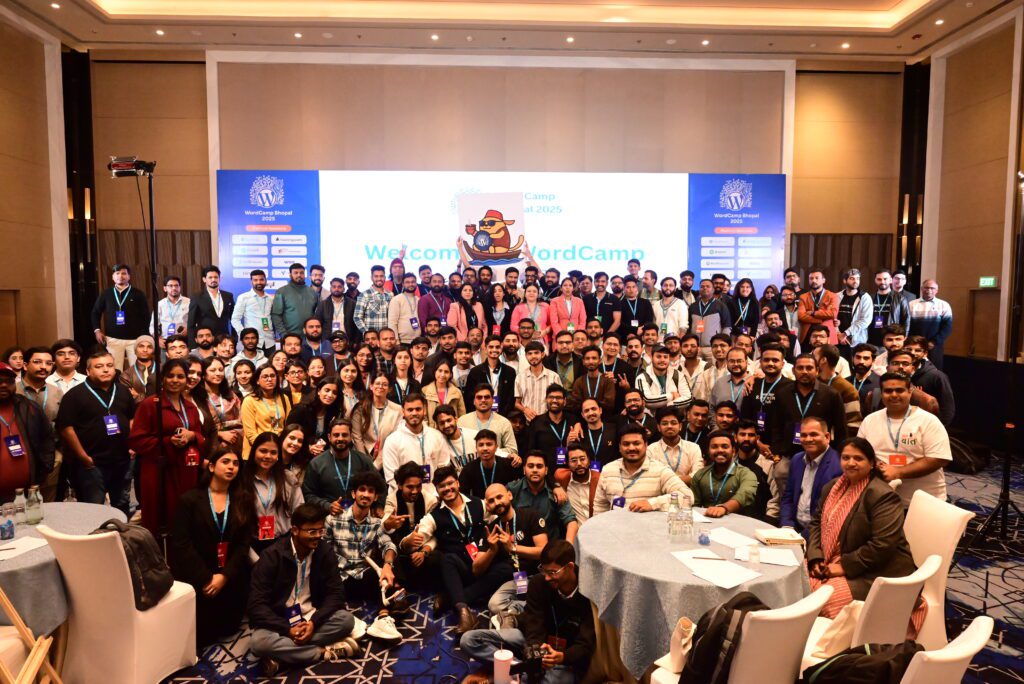
WordCamp Central: WordCamp Bhopal 2025: A Decade of Community, A Weekend That Felt Like Home

I’m writing this post with a smile that refuses to leave my face. Because WordCamp Bhopal 2025 being a feather in our hat as a community wasn’t just another event on the calendar, it was deeply personal. For the WordPress Bhopal community, and for me, it marked something special: 10 years of showing up, learning together, and building something real. And what better way to celebrate a decade of community than by hosting a WordCamp that truly felt like home? A Celebration of Culture — Shared Both Ways At its heart, WordCamp Bhopal 2025 was about culture — built and shared in two directions. On one side, it was about bringing the larger WordPress and tech ecosystem to the city. Giving our local audience — students, first-time attendees, and curious minds — a glimpse of where the ecosystem is headed, how far it has grown, and what’s possible for them right here. On the other, it was about opening Bhopal up to the wider community. Welcoming people from outside and showing them the city of lakes, the warmth of its people, and the potential that quietly exists here — in ideas, in talent, and in shared spaces. This edition was also about quality & thought. Not scale. Not noise. But an intentional step forward — our way of upgrading how we learn, connect, and host. Because at the end of the day, human connection is the real network. Laying the Groundwork Behind what everyone saw on the event days was months of quiet, consistent effort. One of our strongest pillars was a four-month journey called the WP Build Tour — an initiative across colleges in Madhya Pradesh. Through sessions and workshops, 1,700+ students were introduced to WordPress, open source, and community-driven learning. Read about WP Build Tour Alongside this, staying true to the ethos of inclusivity and diversity, we hosted EmpowerWP Bhopal 2025 earlier in March — a women-oriented event that brought the community closer to home, quite literally. Read more about EmpowerWP To keep the momentum going in other community spaces, including DevFest Bhopal, we ran the now-iconic ‘Nano Banana Challenge’ as a fun way to spark curiosity around WordCamp Bhopal, and the entries were astonishing. We also consciously expanded our reach beyond the WordPress bubble — welcoming marketers, content creators, influencers, and professionals from across the tech ecosystem. some combinations are just better shaken together. So when WordCamp Bhopal 2025 finally arrived, it carried all of this into the room. When the Curtains Finally Rose Over 400+ attendees came together for a full-scale WordCamp experience which unfolded at Courtyard by Marriott, Bhopal— speaker sessions, hands-on workshops, sponsor booths, community collaboration, and Contributor Day. Parallel tracks allowed people to learn in the way that suited them best. Topics ranged across design, development, WordPress, AI, SEO, mental health, remote work, education, governance, culture, and careers. Day 1 began where WordPress always begins: with contribution. Contributor’s Day wasn’t a formality on the schedule; it was the foundation. Around 150 people joined to contribute to the WordPress project — joining Test, Support, Polyglots, Photo, and Patterns teams. Hesitation slowly gave way to curiosity, and curiosity to confidence. As shared by Makrand on X For many attendees, this was the first time they truly experienced where the WordPress community comes from. Not just as users, but as contributors. It was a quiet, powerful introduction to the spirit of open source — hosted at the property of our Platinum Sponsor, SFA Technologies, who supported the space wholeheartedly. An Evening That Broke the Ice (and the Rules?) One of the most joyful experiments of the weekend was our games and sports evening. No structured networking. No awkward introductions. Just play, teamwork, and laughter. Strangers became teammates. Conversations happened without effort. Team spirit took centre stage. Hosted at The Umbrella Academy, and lovingly brought together with the help of Vartika, the evening carried a simple idea — conferences don’t have to be boring to be meaningful. They can be fun and purposeful. Our official theme?“404: Adulting Not Found.” And honestly, it worked. Beginning With the Drill- Day 2 At the entrance stood our “10 Years of WordPress Bhopal” photo wall — a visual journey through meetups, WordCamps, friendships, and moments that shaped this community. People stopped mid-step. They searched for familiar faces. They smiled, laughed, and reminisced. Some moments don’t need explanations — this was one of them. Another experiment that surprised us was the WordPress Showcase. We invited community members to showcase what they had built. We wondered if we’d get enough responses. Instead, we saw four solid showcases, each carrying stories of effort, learning, and pride. In the series of firsts- we also experimented with custom ID cards for speakers, sponsors, and organisers — a small but thoughtful detail. While extending this to all attendees wasn’t possible this time due to logistical and data-consent challenges, the response was overwhelmingly warm. Swag With a Story This year, swag told a story. Our Wappu this year carried Bhopal in its soul — a tribute to the city of lakes and the warmth of its people.It wasn’t just a mascot, it was our way of saying: this WordCamp belongs to Bhopal, and Bhopal belongs to the community. WAPPUNO, a WordPress-inspired card game featuring Wappus from WordCamps around the world, quietly reminded everyone that while this WordCamp was rooted in Bhopal, it belonged to something much bigger. And when it was time to part, we had our little surprise. Just like in 2023, sustainability stayed close to our hearts. Instead of traditional souvenirs, attendees received seed-embedded thank-you cards — something to plant, nurture, and grow. A reminder that communities don’t end with events. They continue with care, patience, and time. Voices on Stage: Diverse, Honest, Impactful Around 20 resource persons joined us this year, covering a wide range of topics. We were proud to have 6 women speakers, bringing valuable perspectives and diversity to the stage. Two panel discussions stood out for sparking deep conversations: Education to


WordCamp Central: WordCamp Bhopal 2025: A Decade of Community, A Weekend That Felt Like Home Lire la suite »

Gutenberg Times: Block Themes, Icon Block and AI –Weekend Edition #356

Hi there, AI is on my mind a lot these days. It speeds up my life when I research or analyze content, tools and technology. Even more so when working on workflow automation. This week saw an “explosion of visible AI progress in the WordPress project” as James LePage calls it. And on my travel through the feeds Block Themes and theme.json appeared as an important topic. We are less than two weeks and one Gutenberg release away from WordPress 7.0 Beta 1 release on February 19th. WordPress 6.9.1 and Gutenberg 22.5 were released.. You all have a wonderful weekend! Yours, Birgit Developing Gutenberg and WordPress As mentioned last week, WordPress 6.9.1 Maintenance Release shipped on Tuesday with 49 bugs fixed throughout Core and the Block Editor. If your site has automatic minor updates enabled you should have it by now. Otherwise you definitely should make it a point to update manually. Rae Morey, editor of The Repository, has the skinny for you in WordPress 6.9.1 Released Gutenberg 22.5 was also released. My post on the Make blog gives you What’s new in Gutenberg 22.5? (04 February). The highlights: Custom CSS Support for Individual Blocks Image Block: Aspect Ratio Control for Wide and Full Alignment List View Improvements Other Notable Highlights, among those, Text-columns support and focal point for fixed Cover background images. In his trac ticket, Fabian Kägy proposed a “coat-of-paint” visual reskin of the WordPress admin for the 7.0 release. The goal is to modernize wp-admin’s appearance. It aims to reduce inconsistencies between older screens and the block editor. All elements should align with the WordPress Design System. Kägy has broken the work into focused sub-tickets covering color variables, buttons, inputs, notices, typography, spacing, and the admin frame. You can test early explorations via WordPress Playground. A new wp-base-styles handle has already landed to share admin color scheme CSS variables across core. Your feedback would be appreciated. 12 days before WordPress 7.0 beta, it’s not clear that it makes it into the next WordPress version. Kägy also mentioned that he is working with Tammie Lister on a post on the Make Core blog. The latest episode is Gutenberg Changelog #125 – WordPress 6.9, Gutenberg 22.1 and Gutenberg 22.2 with JC Palmes, WebDev Studios Plugins, Themes, and Tools for #nocode site builders and owners Troy Chaplin released Planned Outage for Block Themes, a simple maintenance-mode plugin for block themes. You can create your maintenance page directly in the Site Editor or use a maintenance.html template in your theme. Logged-in users can still browse normally, while other visitors see a 503 error with a Retry-After header. It also allows search engine bots to keep crawling during extended outages, helping to maintain your rankings while you make updates. Johanne Courtright has restructured her Groundworx Core product into a bundle of four focused plugins — Query Filters, Showcase (Embla Carousels), Cards & Sections, and Tabs & Accordion — each now available separately. You can still buy the full bundle or grab just what you need. The core block extensions like responsive column controls and unified breakpoints have been spun off into a free plugin called Foundation, which also adds a new Gravity Forms block with proper block theme styling support. Hans-Gerd Gerhards released version 1.5 of his Dynamic Header & Navigation for Block Themes plugin in January, fixing an annoying header flicker when scrolling back near the top of a page. You can now try the plugin instantly via a Live Preview directly from the WordPress plugin directory. Theme Development for Full Site Editing and Blocks Mike Davey, senior editor at Delicious Brains, published a developer’s cheat sheet to theme.json anatomy. You’ll learn how setting the $schema property unlocks IntelliSense in VS Code. The settings section lets you lock down color pickers and font sizes to prevent design drift. The styles section replaces traditional CSS with auto-generated variables. The post also covers block-specific overrides. “Once understood, [theme.json] offers a level of granular control over what clients can and cannot do that was difficult to achieve in the classic PHP era.” Davey wrote. As a side note, the post 15 ways to curate the WordPress editing experience by Nick Diego is still one of the most read articles on the WordPress Developer Blog. You’ll learn how to turn off blocks, unregister variations and styles, lock down color pickers and font sizes via theme.json, restrict access to the Code Editor and Template Editor, and remove Openverse and the Block Directory. The post covers PHP filters, JavaScript techniques, and Editor settings. If you want to dive deeper into how to handle common theme-building problems with theme.json, here is a list of articles for your perusal from the WordPress Developer blog, mostly by Justin Tadlock. How WordPress 6.9 gives forms a theme.json makeover You don’t need theme.json for block theme styles Mastering theme.json: You might not need CSS Adding and using custom settings in theme.json How to modify theme.json data using server-side filters by Nick Diego Customizing core block style variations via theme.json Per-block CSS with theme.json Leveraging theme.json and per-block styles for more performant themes Johanne Courtright makes a compelling case for why she chooses Gutenberg over Elementor. She argues that Elementor became a CMS inside a CMS—duplicating templates, colors, typography, and breakpoints WordPress already provides. The result? Specificity wars, inline styles, and sites that break when you deactivate the plugin. With Gutenberg and theme.json, you get one source of truth: change a spacing value once, see it everywhere. Her clients now update their own sites without calling for help. “Keeping up with Gutenberg – Index 2025” A chronological list of the WordPress Make Blog posts from various teams involved in Gutenberg development: Design, Theme Review Team, Core Editor, Core JS, Core CSS, Test, and Meta team from Jan. 2024 on. Updated by yours truly.  The previous years are also available: 2020 | 2021 | 2022 | 2023 | 2024 Building Blocks and Tools for the Block editor. In his latest live stream, Getting the Icon Block ready for WordPress 7.0, Ryan Welcher

Gutenberg Times: Block Themes, Icon Block and AI –Weekend Edition #356 Lire la suite »

HeroPress: Many thanks to Ninja Forms

Yesterday Ninja Forms became the latest WordPress company to financially support HeroPress! They’ll now be listed forever on the Sponsor Wall Of Fame. I’ve used Ninja Forms for years, and it’s an excellent forms plugin, so if you need one give it a shot! If you or your organization would also like to support HeroPress financially, please head over to the donate page. The post Many thanks to Ninja Forms appeared first on HeroPress.

HeroPress: Many thanks to Ninja Forms Lire la suite »