Gutenberg Times: Block Theme Guide, AI Galore, Icon Block, WordPress 7.0 — Weekend Edition 357
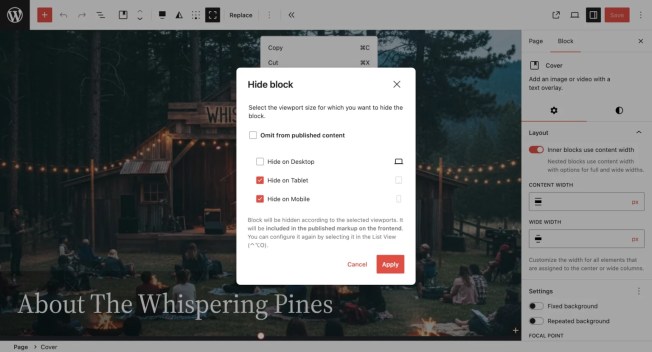
Hi there, If you celebrate it, Happy Valentines day! This week, WordPress developers and co-workers share their experiences exploring AI workflows around development and creation. These are exciting times for sure! It’s good to be back behind the mic after an operation that irritated my vocal cord nerve — I’m still a bit hoarse, but that’s nothing new for this podcast, and I’m perfectly healthy otherwise. Have a lovely weekend! Yours, Birgit Developing Gutenberg and WordPress As a reminder, WordPress 7.0 Beta 1 is scheduled for February 19th and is considered Feature Freeze during this release cycle. Only bug fixes will make it into WordPress 7.0 after that date, until March 19, 2026, Release candidate 1 will be released. Around that time, the Field Guide will be published and it also comes with a String Freeze, so the translators of the Polyglotts team can start their work in translateing WordPress 7.0 into many languages. Justin Tadlock‘s February developer roundup covers the rush toward WordPress 7.0 Beta 1. Highlights for your development work include the always-iframed post editor, viewport-based block visibility, per-block instance custom CSS, and a restructured Tabs block with inner blocks. You’ll also find updates to the AI Experiments plugin, new UI primitives and components, the reinstated Pullquote block, Navigation Overlay improvements, and wp-env now running on the Playground runtime. Carolina Nymark is back as Core Contributor and she joined me on our first episode of 2026. On the Gutenberg Changelog #126, we talk about Gutenberg 22.3, 22.4 and 22.5 releases. As the three release had over 700 PRs merged, we were only able to cover the major enhancements and a few improvements. It was a fun conversation again. The episode will drop in your favorite podcast app on Sunday. The latest episode is Gutenberg Changelog #125 – WordPress 6.9, Gutenberg 22.1 and Gutenberg 22.2 with JC Palmes, WebDev Studios JuanMa Garrido is part of the release squad for WordPress 7.0 as a co-triage lead. To make is work a bit easier he created WP TRAC Triager. It’s a Chrome extension helper for the WordPress Trac ticket triage workflow and enhances it with smart timelines, universal role badges, keyword change history, and a fully customizable sidebar. It is ideal for WordPress contributors who want to streamline their triage process and make informed decisions based on complete context. The code is available on GitHub. Plugins, Themes, and Tools for #nocode site builders and owners Bud Kraus walks you through building WordPress blocks with Telex, Automattic’s browser-based AI tool that generates block plugins from natural language prompts. You’ll see two real examples — a ChatGPT embed and an editor-only Social Draft block — highlighting both the speed of prototyping and the iterative refinement that vibe coding still demands. Telex handles scaffolding, building, and packaging without a local dev environment, though Kraus is clear that understanding block architecture remains essential once you move beyond experimentation. And I just tested Telex again, and now it also can build block themes from a plain-english prompt. Try it out! Troy Chaplin built ReadEase: Text Resizer — a Gutenberg block that gives your site visitors controls to scale text for better readability. You can choose from four control styles (dropdown, buttons, slider, or icons), configure scale ranges, and scope the effect to the full page or just the content area. Preferences persist via localStorage with cross-tab sync, and the block is fully accessible with keyboard navigation, ARIA labels, and reduced-motion support. Theme Development for Full Site Editing and Blocks Varun Dubey has put together a thorough guide to WordPress Full Site Editing for 2026, covering everything from your first block theme setup to advanced techniques like the Block Bindings API and synced patterns. You’ll find practical code examples for theme.json configuration, custom templates, template parts, and block patterns, along with a step-by-step classic-to-block-theme migration roadmap. It’s a solid reference whether you’re just getting started with FSE or looking to deepen your understanding ahead of WordPress 7.0. “Keeping up with Gutenberg – Index 2025” A chronological list of the WordPress Make Blog posts from various teams involved in Gutenberg development: Design, Theme Review Team, Core Editor, Core JS, Core CSS, Test, and Meta team from Jan. 2024 on. Updated by yours truly. The previous years are also available: 2020 | 2021 | 2022 | 2023 | 2024 Building Blocks and Tools for the Block editor The saga continues: Ryan Welcher live streamed again on his work on the Icon Block for WordPress 7.0 Ai and WordPress Eric Karkovack sits down with Jason Adams on the WP Minute+ to discuss the AI Team’s big plans for WordPress 7.0. You’ll hear how the Abilities API and MCP adapter lay the groundwork for plugin developers to integrate AI through the WordPress AI client, while WordPress 7.0 aims to ship foundational “under-the-hood” features for your projects. The conversation also covers how web hosts can simplify AI setup and why AI should remain a choice, not a mandate, across the ecosystem. In her post WordPress: From CMS to agentic platform Human Made’s Sarah Jones explains that WordPress is changing from a content management system to a more active platform. This change involves new tools like the Abilities API, which helps plugins function better, and MCP, which allows AI agents to use real site data. The important takeaway for businesses is that these agents have the same permissions as human users, maintaining control while benefiting from WordPress’s large network of 60,000 plugins, which offers advantages that closed systems can’t provide. I revamped my workflow writing tutorials for the Developer Blog and shared some details on my personal blog: my local tutorial creation flow with Claude Code. I walk you through how I build example plugins, draft developer blog posts in block notation, and publish directly to a local WordPress Studio site — all from the terminal. The setup relies on the WordPress MCP Adapter and a custom Content Abilities plugin to give Claude content access locally. The workflow saves me quite a